Key takeaways
- The most useful chatbot design examples are shipped products whose failure behavior is written in their own help docs.
- GitHub sizes artificial intelligence (AI) help to the task: inline suggestions while you type and the Chat view for questions and planning.
- Zendesk designs two no-answer states: a default reply and a separate reply for when no person can take the chat.
- Intercom says Fin never offers escalation twice in a row; a repeat trigger hands the chat to the team instead.
- Copy the pattern for your bot's weakest gate first, then score the whole bot against all 8 gates.
The chatbot design examples I learn the most from sit in help centers, not galleries, because one documented rule says more than ten polished screenshots. Intercom's article on Fin's escalation rules is a good case: Fin will not repeat a handoff offer back to back. If the trigger fires again straight after an offer, the conversation goes to the team. No screenshot can show that rule, yet it decides whether a frustrated customer gets out of the loop.
Below are 7 shipped products read from their own public documentation: GitHub Copilot, Bank of America's Erica, Zendesk, Perplexity, ChatGPT, Intercom Fin and Salesforce Agentforce. For each one I give what to copy, what to avoid and the design gate it teaches. You leave with patterns for your own support bot or artificial intelligence (AI) assistant.
Since 2017, the designers at tkxel's ui-ux.agency have designed 200+ products. I'm a Senior Communication Designer on that team, and this teardown turns each product's documented behavior into a user interface (UI) wireframe with callouts. The same behavior-first habit shapes our chatbot UI design projects, which open on real transcripts rather than on screens.
Which chatbot design examples are worth studying?
The chatbot design examples worth studying are shipped products whose behavior is written in their own documentation, because a help article shows the failure path a screenshot hides.
My selection rule judges documentation, not looks. Each example is a shipped product whose pattern is described in its company's own public documentation. Every company is based in the US, and every source is a help center, developer docs, a conformance report or a press release. Concept shots and unsourced screenshots are out, however good they look.
Every figure in this post is our own wireframe of a documented behavior, labeled as illustrative, with no logos, brand colors or copied screens. Vendor docs change, so the facts below reflect each article as of October 2026; check the linked page before you copy a pattern. Each product documents one of the chatbot design patterns a team can reuse, and each maps to a gate in our 8-step chatbot design checklist.
Most AI assistant examples in galleries skip the documentation entirely. Read this way, a bot teardown becomes interaction design homework: it shows how conversational AI behaves under stress, which is where user experience design pays off. The support bot and the AI assistant differ in scope: one resolves questions a team can list in advance, the other takes requests nobody scripted. Both kinds appear in the map below.
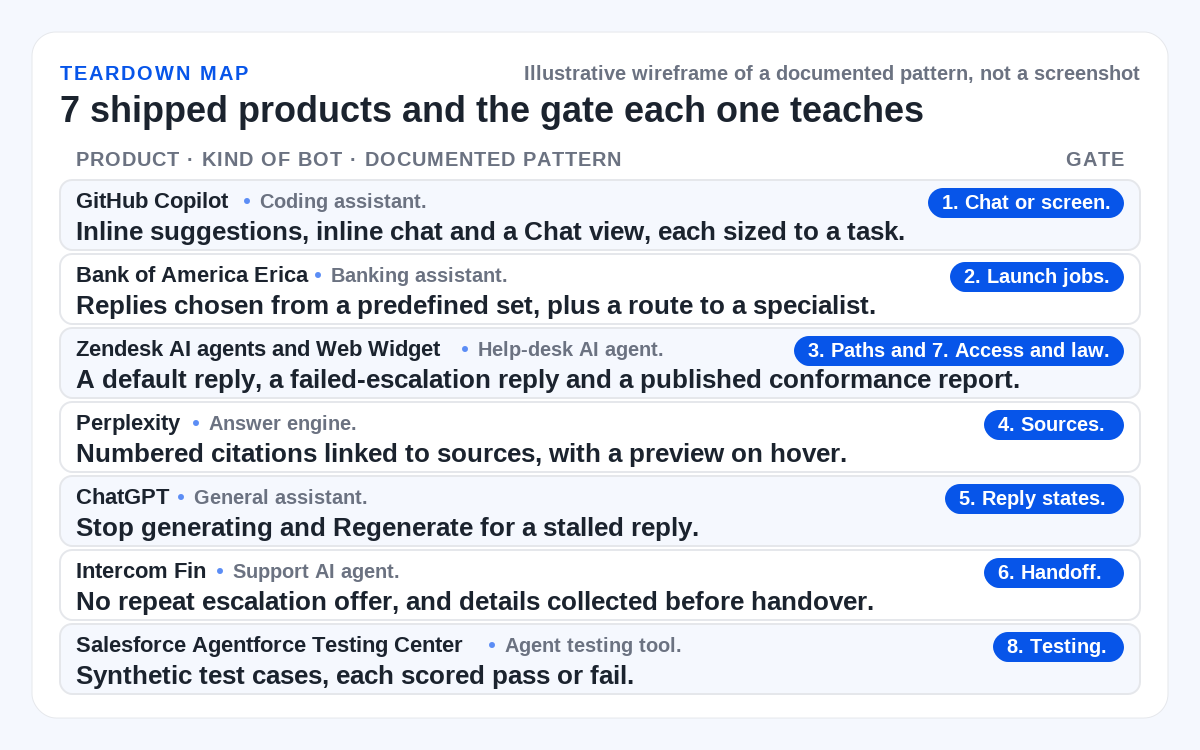
This map lists each product, the kind of bot it is, the pattern its documentation describes and the checklist gate it teaches.
| Product | Kind of bot | Documented pattern | Gate |
|---|---|---|---|
| GitHub Copilot | Coding assistant. | Inline suggestions, inline chat and a Chat view, each sized to a task. | 1. Chat or screen. |
| Bank of America Erica | Banking assistant. | Replies chosen from a predefined set, plus a route to a specialist. | 2. Launch jobs. |
| Zendesk AI agents and Web Widget | Help-desk AI agent. | A default reply, a failed-escalation reply and a published conformance report. | 3. Paths and 7. Access and law. |
| Perplexity | Answer engine. | Numbered citations linked to sources, with a preview on hover. | 4. Sources. |
| ChatGPT | General assistant. | Stop generating and Regenerate for a stalled reply. | 5. Reply states. |
| Intercom Fin | Support AI agent. | No repeat escalation offer, and details collected before handover. | 6. Handoff. |
| Salesforce Agentforce Testing Center | Agent testing tool. | Synthetic test cases, each scored pass or fail. | 8. Testing. |
Gate 1 asks whether chat is the right surface at all, and a coding assistant answers that best.
GitHub Copilot: when should AI help skip the chat panel?
Among chatbot design examples, GitHub Copilot sizes the surface to the job: inline suggestions while you type, inline chat for a quick edit and the Chat view for questions.
GitHub's Copilot best-practices guide says inline suggestions work best for completing code snippets, variable names and functions as you write them. It points to Copilot Chat for questions about code and for generating large sections of code. GitHub's overview of Copilot in IDEs adds that Chat is where you compare approaches and plan complex changes.
The Visual Studio Code (VS Code) docs on inline chat describe it as a tool for quick, targeted edits within the visible code. Multi-step tasks and changes across several files belong in the Chat view instead. VS Code's November 2025 release notes (version 1.107) say that a task inline chat cannot handle is upgraded to the Chat view, where the prompt is replayed with the same model and context.
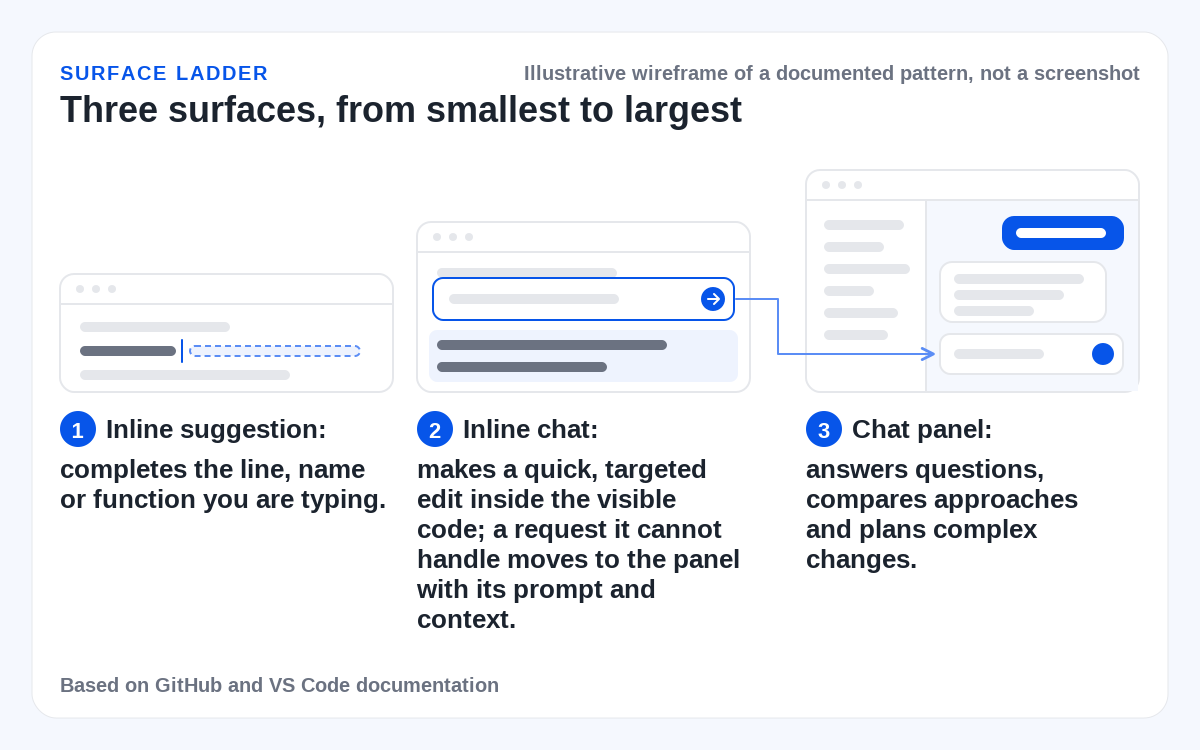
Three surfaces, from smallest to largest, based on GitHub and VS Code documentation:
- Inline suggestion: completes the line, name or function you are typing.
- Inline chat: makes a quick, targeted edit inside the visible code; a request it cannot handle moves to the panel with its prompt and context.
- Chat panel: answers questions, compares approaches and plans complex changes.
- What to copy: match the surface to the size of the job, and let the small surface hand off to the large one without losing context.
- What to avoid: a chat panel for a job that a field or one inline action finishes faster. That is Gate 1 in the checklist.
Say you design a hypothetical field-service scheduling tool for US contractors. An inline "suggest a technician" action on the job card fills the slot in one tap. The assistant panel stays for open questions, such as why yesterday's route ran late.
Once chat earns its place, the next question is how many jobs it should take on.
Erica: how narrow should a chatbot's job list be?
Erica shows how far a narrow job list goes: Bank of America says it picks answers from a predefined set and routes clients to a specialist when it cannot help.
Bank of America's frequently asked questions (FAQ) page on Erica says Erica does not use generative AI or large language models (LLMs). The assistant analyzes each question with natural language processing grounded in machine learning. After it reads a question's intent, Erica chooses a reply from a predefined set of answers. When it does not understand or has no good answer, it can pass the client to a specialist over the phone or in chat.
Narrow is not small. The bank's March 2026 press release reported that Erica had handled more than 3.2 billion client interactions since its 2018 launch.
So is a bot with predefined answers, the trait Erica shares with a rule-based chatbot, still a good example in the LLM era? Yes, for fixed, high-volume jobs where a wrong answer costs money, such as banking and fintech assistants. A generated reply adds risk there, and a scripted one keeps every answer reviewable.
- What to copy: a scoped job list, answers you can predict and a named exit to a person.
- What to avoid: carrying that narrowness into an open-ended product, where off-list questions pile up with nowhere to go. Gate 2 asks for a launch list where every job has an answer source.
Every scoped bot meets a question nobody gave it, and the next product documents what to say then.
Zendesk AI agents: what should a chatbot say with no answer?
One of the clearest chatbot design examples for fallback comes from Zendesk AI agents, which split "no answer" into a default reply and a separate failed-escalation reply.
Zendesk's article on system replies for AI agents says the default reply runs when no use case matches and no generative reply can be produced. A separate failed-escalation reply covers conversations that cannot be escalated, for example when no human agents are available. In Zendesk's legacy messaging setup, admins can add an option to talk to a human after the default reply (there called the fallback response), which adds an escalation step.
That optional handoff step is why the split matters. With it switched off, a default reply can end as an apology without a next step.
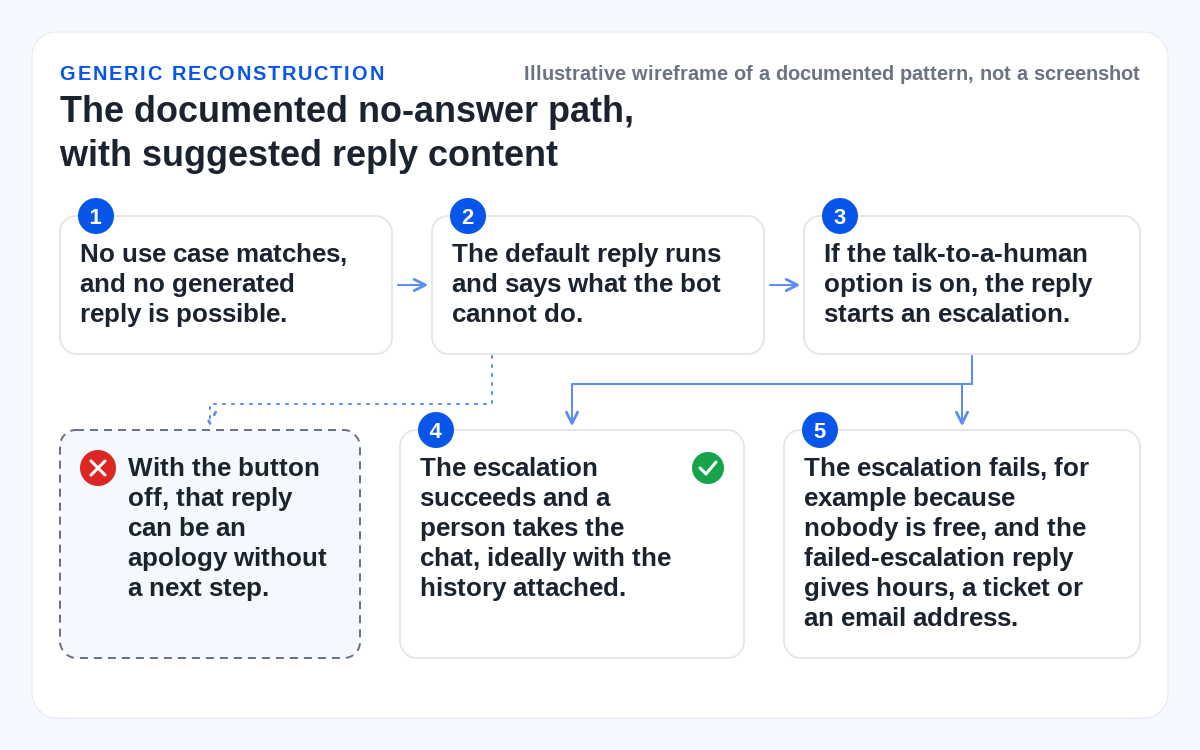
A generic reconstruction of the documented no-answer path; the reply content in steps 2 and 5 is our suggestion, not Zendesk's default:
- No use case matches, and no generated reply is possible.
- The default reply runs and says what the bot cannot do.
- If the talk-to-a-human option is on, the reply starts an escalation.
- The escalation succeeds and a person takes the chat, ideally with the history attached.
- The escalation fails, for example because nobody is free, and the failed-escalation reply gives hours, a ticket or an email address.
With the button off, that reply can be an apology without a next step.
- What to copy: two states with two messages, each ending in a next action such as support hours, a ticket or an email address.
- What to avoid: a default reply that apologizes and stops. Gate 3 covers the reprompt ladder that should run before any fallback.
Generated answers add a new failure: an answer that sounds right and is not. Perplexity answers it with sources you can open.
Perplexity: how do citations make AI answers checkable?
Among chatbot design examples, Perplexity makes answers checkable: numbered citations link each claim to its source, with a preview on hover.
Perplexity's getting-started page says its answers link to numbered citations, and hovering a marker previews the source before you click through to it.
Builders need a sharper rule than readers do, and Perplexity's developer docs give it. Take source links from the structured search results, not from the model's text, because a model can mistype or reword a link. That rule applies to any answer engine you design.
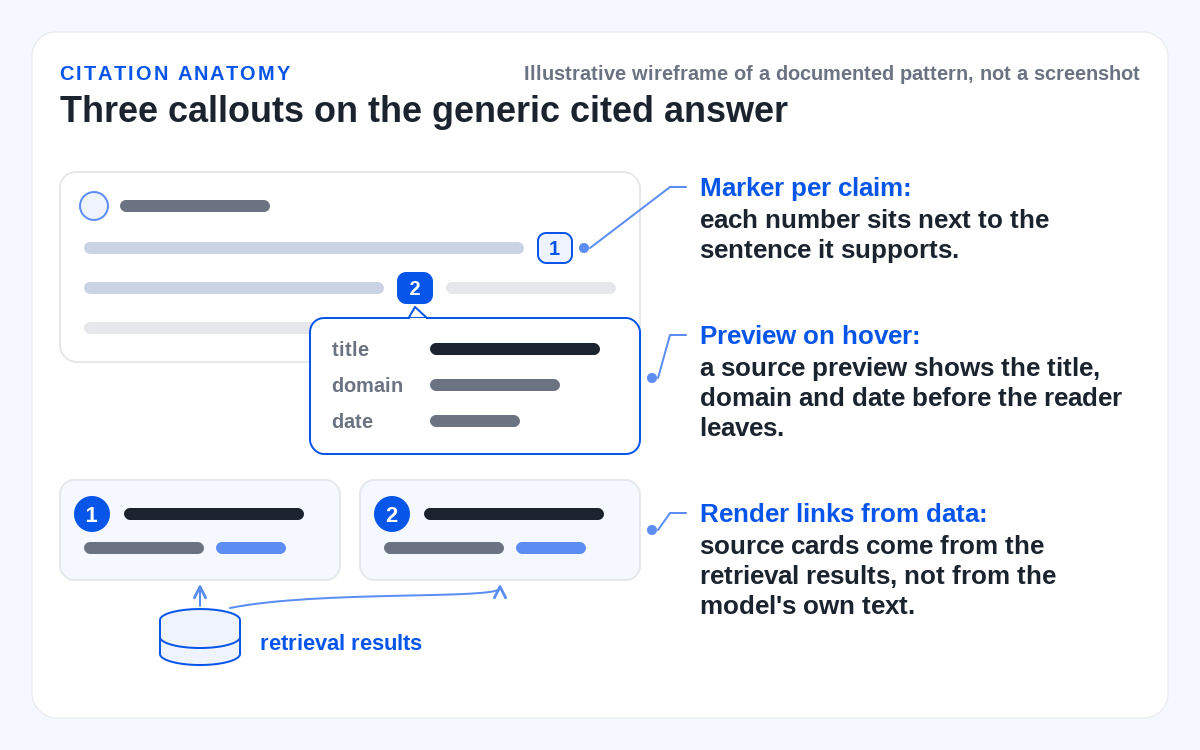
Three callouts on the generic cited answer:
- Marker per claim: each number sits next to the sentence it supports.
- Preview on hover: a source preview shows the title, domain and date before the reader leaves.
- Render links from data: source cards come from the retrieval results, not from the model's own text.
- What to copy: a marker per claim, tied to a source card with a source preview, with the cards built from retrieval data.
- What to avoid: links the model wrote into its own prose. A numbered citation shows where an answer came from; it does not prove the answer right. Gate 4 asks every answer that can trigger an action to show its source.
I treat checkable answers as the base layer of AI product design, not a finishing touch. Source previews and confidence cues are standard parts of our AI UX design work, inside chat and outside it.
A sourced answer still takes seconds to arrive, and sometimes it never does.
ChatGPT: which controls does a slow or stuck reply need?
A slow or stuck reply needs a stop control and a retry control; OpenAI's help center tells ChatGPT users to wait 30 to 60 seconds, then Stop generating and Regenerate.
As of October 2026, OpenAI's troubleshooting article gives that order for a response that stalls. The labels are OpenAI's and can change between releases, so check the article before you copy them.
What to copy: three controls on every streaming reply.
- A stop button, so users can cut off a reply heading the wrong way.
- A regenerate button, so a failed or weak answer gets a second try in one tap.
- An editable prompt, so users fix their wording instead of retyping it.
What to avoid: a stall that leaves recovery to the user. I design a timeout state that offers a retry by itself after a set wait, timed against how long your own model's answers usually take. That is Gate 5: no reply state ends without a next action.
When retrying does not help, the user needs a person.
Intercom Fin: how does a chatbot hand off without looping?
The handoff pattern in these chatbot design examples comes from Intercom: Fin never offers escalation twice in a row, and a repeat trigger escalates the chat at once.
Fin's maker renamed itself from Intercom to Fin on May 12, 2026, and Intercom remains the name of its help desk and help center. Salesforce completed its acquisition of Fin on September 10, 2026.
Intercom's escalation article, linked above, frames the rule as a guard against looping. Intercom's article on Fin in workflows documents a second setting, collect more information when a customer asks to speak to the team, which lets the agent gather details before passing the conversation to a teammate. The human handoff then starts with context.
Two documented limits are worth designing around. As of October 2026, the escalation article says that over chat the agent shows no standard quick reply buttons and offers escalation in text. With no human routing target, the article on bot-only mode says Fin does not offer escalation, and the conversation ends with a "get more help" outcome. Escalation guidance can tell the agent to share team hours or next steps in that case.
- What to copy: the loop guard and the detail-gathering step before handover.
- What to avoid: a handoff message that lives only in a text line users scroll past, and a bot-only path that ends without hours or another route. I'd pair the loop guard with a handoff button that stays visible and passes the chat history to whoever picks it up.
Gate 6 in the checklist covers when a bot should pass the chat to a person.
Check your own bot now: does it repeat the offer to reach a person, and what does it say when nobody is on shift? When we redesign a live bot, the work opens on its transcripts and analytics, and the flows where most users drop off get fixed first. We also add a visible route to a person after two failed turns and pass the chat history along.
An escape route that a screen reader user cannot hear is no escape route.
Zendesk widget: what should an accessible chatbot announce?
An accessible chatbot announces every status change a sighted user sees; Zendesk's 2022 widget report found the animated typing dots were not conveyed to screen reader users.
Zendesk built its 2022 Web Widget Accessibility Conformance Report (ACR) on the Voluntary Product Accessibility Template (VPAT) 2.4. The report noted that a moving three-dot typing indicator was not conveyed to screen reader users. Sighted users saw it as the sign that an agent was typing. The Web Widget changelog later lists a December 2024 fix so that JAWS screen readers announce typing status.
- What to copy: publish a conformance report, fix what it finds and log the fix where builders can see it. Announce typing, new answers and transfer status as status messages.
- What to avoid: a status shown only as animation, the gap the company recorded in its 2022 report.
The other half of Gate 7 is bot disclosure. Erica's FAQ, linked above, calls Erica a virtual financial assistant and not an actual person, a plain line I'd put in every greeting. Message text in the chat windows we design meets a contrast ratio of 4.5:1 or more. Gate 7 of the checklist covers bot disclosure law and Web Content Accessibility Guidelines 2.2 (WCAG 2.2) at level AA.
Every pattern above needs proof before launch, and Salesforce documents a tool built for that.
Agentforce: how do teams test a chatbot before launch?
Salesforce's Agentforce Testing Center tests an AI agent before launch by running synthetic customer requests in a sandbox and marking each test case pass or fail.
The Salesforce Agentforce Testing Center was announced on November 20, 2024 as a way to generate synthetic interactions at scale and run them in sandboxes before an agent goes live. Trailhead's unit on test results shows a pass or fail for the subagent the agent picked (older Salesforce material calls these topics), the actions it took and its response. Of the chatbot design examples here, this is the one built to test the rest before users meet them.
- What to copy: expected outcomes written before the run, tests at volume in a sandbox and off-list or hostile requests in the set.
- What to avoid: treating synthetic test cases as a stand-in for people. Synthetic cases check routing, actions and responses against expected outcomes; people check whether the wording makes sense to them and whether they trust it.
That is why our conversation testing gives users real tasks inside a clickable prototype and scores how many finish and in how many turns. Gate 8 turns those sessions into a transcript scorecard.
With all 7 read, the question is which pattern to borrow first.
Which chatbot design examples should your team copy first?
Start with the chatbot design examples that fix your weakest gate: a support bot that traps users needs Zendesk's two fallback replies and Fin's loop guard first.
An assistant whose answers users doubt starts with Perplexity-style citations instead. The swipe card below sets the 7 products side by side: what to copy and what to avoid.
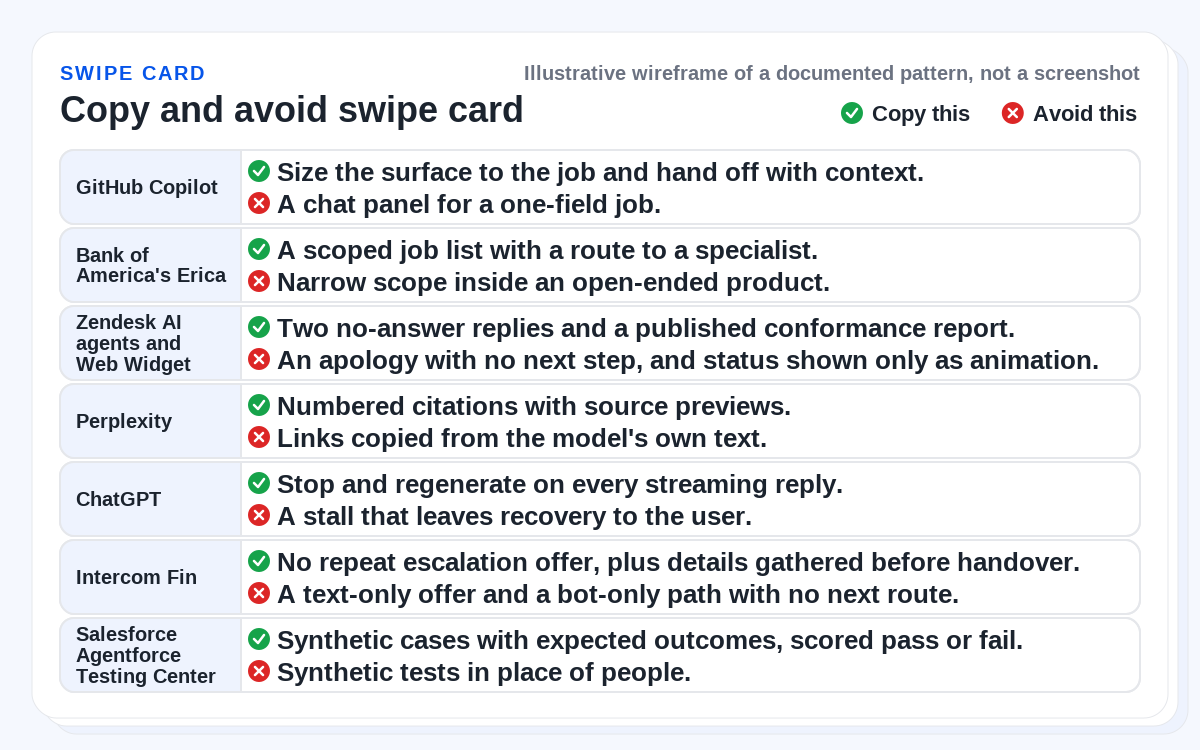
Each row pairs one documented pattern to copy with one limit to avoid.
| Product | Copy this | Avoid this |
|---|---|---|
| GitHub Copilot | Size the surface to the job and hand off with context. | A chat panel for a one-field job. |
| Bank of America's Erica | A scoped job list with a route to a specialist. | Narrow scope inside an open-ended product. |
| Zendesk AI agents and Web Widget | Two no-answer replies and a published conformance report. | An apology with no next step, and status shown only as animation. |
| Perplexity | Numbered citations with source previews. | Links copied from the model's own text. |
| ChatGPT | Stop and regenerate on every streaming reply. | A stall that leaves recovery to the user. |
| Intercom Fin | No repeat escalation offer, plus details gathered before handover. | A text-only offer and a bot-only path with no next route. |
| Salesforce Agentforce Testing Center | Synthetic cases with expected outcomes, scored pass or fail. | Synthetic tests in place of people. |
If you came for chatbot design ideas, take one pattern per gate, not one screen per brand. Those chatbot design patterns survive the next redesign because they live in behavior rather than pixels.
Read these chatbot design examples as a to-do list. Pick the one row your bot fails, sketch that pattern this week, then score the whole bot against the 8 gates in the checklist linked above. If several rows fail at once, start with the four chatbot mistakes we fix most; a missing escape route is one of them.
I'd sketch the fallback reply before the greeting, because the moment a bot fails is the screen users judge it by.
FAQs
What makes a chatbot a good example to copy?
A good example shows what the bot does when things go wrong, not only its happy screen. Zendesk's split between a default reply and a failed-escalation reply teaches more than a polished layout, because both replies end with a next step.
Why does this teardown use wireframes instead of screenshots?
Screens change between releases and belong to their companies. We turn each documented behavior into a neutral wireframe, label it as illustrative and link the doc it came from, so the pattern stays useful after the next release.
Is a rule-based chatbot still worth copying in the LLM era?
Yes, for fixed, high-volume jobs where a wrong answer costs money. Bank of America says Erica reads intent with machine learning, then picks from a predefined set of answers, with no generative AI. Open-ended questions call for an LLM assistant with citations and a handoff.
Where else can I find good chatbot examples?
Galleries such as Mobbin and Dribbble collect many screens, though Dribbble mixes in concepts that never shipped. For behavior, read a product's help center and its accessibility conformance report, then test the pattern with your own users.
Which examples fit a support bot, and which fit an in-product assistant?
Erica, Zendesk and Intercom Fin show support patterns: scoped jobs, fallback replies and handoff. GitHub Copilot, Perplexity and ChatGPT show assistant patterns: surface choice, citations and reply controls. The Agentforce testing approach applies to both kinds.