
Healthcare UX design for digital health SaaS, clinical AI and telehealth apps
We design patient, caregiver and clinician experiences where AI output is checkable, protected health information stays out of sight until it is needed, and every screen is designed to WCAG 2.2 AA (Web Content Accessibility Guidelines).
In short
Healthcare UX design is the user experience (UX) design of digital health products, so patients, caregivers and clinicians can act on health information safely and quickly. At ui-ux.agency, part of tkxel, we design software as a service (SaaS), clinical artificial intelligence (AI), telehealth and wellness products for US companies, turning privacy, medical-device and accessibility rules into screen decisions.





- Senior designers only
- NDA signed on request
- Answer within one business day, ET
Get a free consultation
No-cost project review · answer within one business day, ET
Which healthcare UX work can you review?
How we design for healthcare
A patient, a caregiver with proxy access and a clinician often open the same record on three different screens. Good health app UX decides what each of them sees first, what stays hidden and where AI output waits for a human check.
- Clinical AI copilots and clinical decision support screens that show the basis for every suggestion
- Digital health SaaS for clinics, care teams and payers: scheduling, intake forms, admin and reporting
- Telehealth, virtual-care and remote patient monitoring apps, from the device check to the visit summary
- Patient portal design and caregiver apps with proxy access settings and plain-language results views
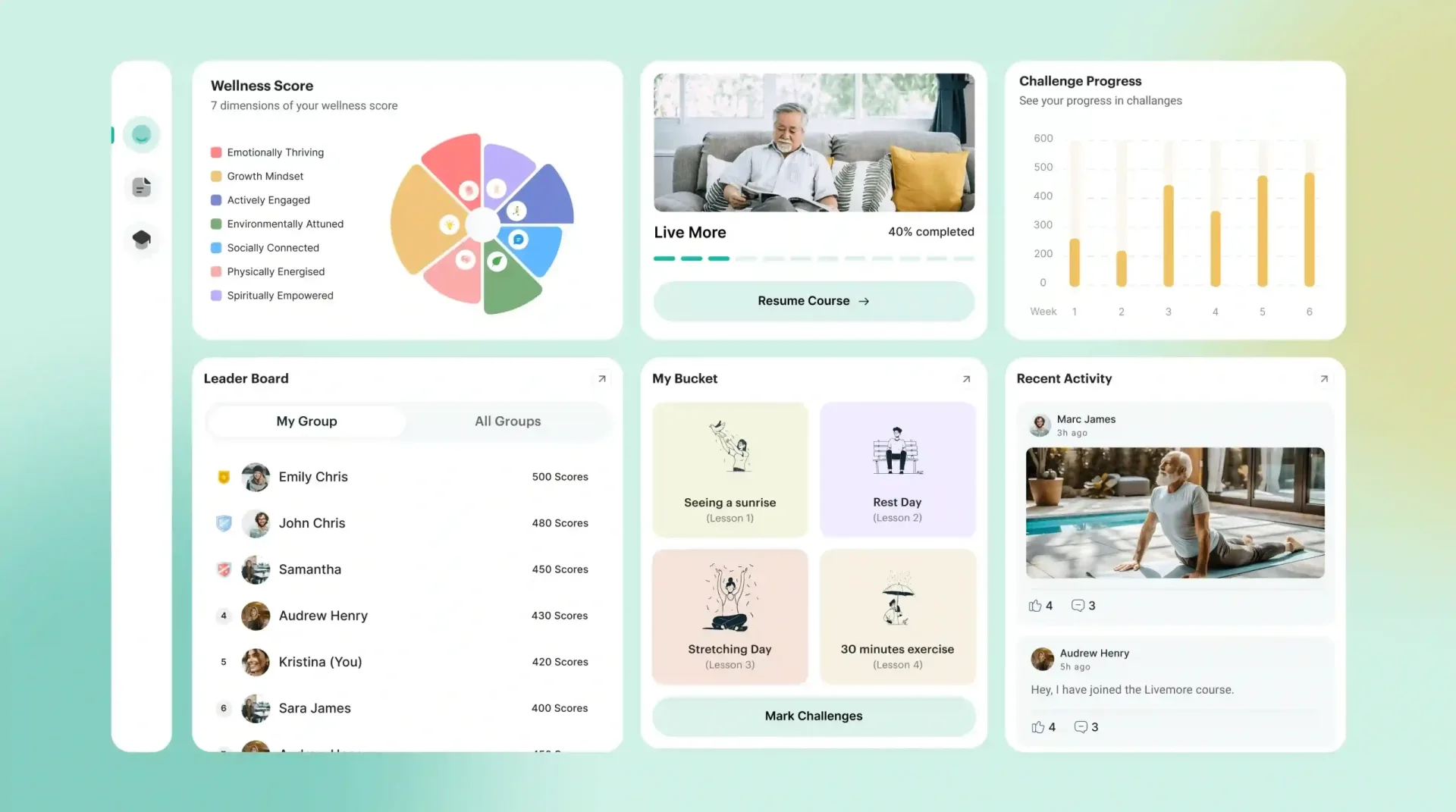
- Wellness app design for coaching and habits, like the Elia Wellness platform for adults over 50
What makes healthcare UX design different for patients, caregivers and clinicians?
Healthcare UX design has to serve three readers of one record, fit workflows clinicians already rate poorly, make AI output checkable and turn privacy and device rules into interface copy. Each problem below names the screen decision it forces.
Three users read the same record
One chart has to open three ways: for the patient, the caregiver and the clinician. The patient wants a plain-language results view, the caregiver needs only the access the patient approved, and clinician dashboard design leads with trends and open orders. Data from the Assistant Secretary for Technology Policy and Office of the National Coordinator for Health IT (ASTP/ONC) show caregiver proxy access rising between 2020 and 2024. We design role-based views and consent-aware proxy flows.
New tools land in crowded clinical workflows
A new clinical tool adds its clicks to a clinical workflow that clinicians already rate poorly. In a 2019 Mayo Clinic Proceedings study of 870 US physicians, EHR usability averaged 45.9 out of 100, and each 1-point gain was linked to about 3% lower odds of burnout. That finding is a correlation, not a cause. So our first step maps the current workflow and each user role before we add a single screen to it.
AI output has to be checkable
Physicians set conditions before they adopt AI, and each condition becomes a screen. In the AMA's 2024 physician survey, the top requirements were a designated feedback channel (88%), data privacy assurances (87%) and EHR integration (84%). We turn them into a flag-this-answer control, a privacy note at the point of use and a launch from inside the EHR, with the source of each AI answer one tap away.
Regulation shows up as interface copy
Consent screens, notification text and result labels carry legal weight. The Health Insurance Portability and Accountability Act (HIPAA) minimum necessary standard shapes what each role's view shows. Wellness apps outside HIPAA can still fall under the Federal Trade Commission (FTC) Health Breach Notification Rule, which the FTC says applies to most health apps; its amendments took effect July 29, 2024. For sensor-based products, the Food and Drug Administration (FDA) general wellness guidance, reissued January 2026, keeps disease names and 'abnormal' labels out; your regulatory counsel confirms which rules apply.
Patients juggle portals and devices
A new patient app lands on a phone that already holds several portals, so sign-in, account linking and record import are its first hurdles. ASTP/ONC reports that app-based access to online medical records rose from 38% in 2020 to 57% in 2024. We design those first-run steps, plus the clinic onboarding flows on the staff side, before any feature screen.
Which of our services cover healthcare UX design?
AI UX design agency
User experience design for AI features and AI-first products, from prompt input to feedback loops.
02Chatbot UI design
Conversation design and interface design for AI chatbots, assistants and support bots.
03SaaS design agency
End-to-end product design for B2B and B2C software as a service.
04MVP design agency
Design of a minimum viable product, from first research to a tested clickable prototype.
05Product design agency
End-to-end digital product design for startups and scale-ups after launch.
06AI product discovery workshop
A 1 to 2 week workshop that picks the AI use cases worth building and scopes the first one.
How does healthcare UX design handle AI, FDA and HIPAA on the screen?
Healthcare UX design turns FDA guidance, HIPAA rules and AI review into screen elements that a clinician or patient sees at the moment of use. The six patterns below cover AI review, patient-facing limits, model updates, privacy, telehealth visits and WCAG 2.2 AA; your regulatory counsel decides which rules apply.
Recommendation panels clinicians can verify
A recommendation panel shows the clinician the basis for each suggestion before they act on it. FDA's clinical decision support (CDS) guidance, revised in January 2026, explains the four non-device criteria in section 520(o)(1)(E) of the Federal Food, Drug, and Cosmetic Act; one is that a health care professional can independently review that basis. We place inputs, source, logic summary and known limits beside accept, edit and dismiss. Your regulatory counsel makes the classification call.
Patient-facing AI with clear limits
Patient-facing AI gets no CDS exclusion, because the non-device criteria cover only software that supports health care professionals. A symptom checker or triage chat therefore opens with a scope statement, shows what the tool cannot do, avoids diagnosis wording and offers a clear route to a person. Our conversational intake and triage design builds these states in. Your regulatory counsel judges whether the tool is a device.
AI interfaces ready for model updates
Version labels, 'what changed' notes and stable controls let a model update ship without forcing clinicians to relearn the screen. FDA's final guidance on Predetermined Change Control Plans (PCCPs) lets makers of AI-enabled device software describe planned model changes in advance. ONC's HTI-1 (Health Data, Technology, and Interoperability) rule asks certified health IT to show source attributes for predictive decision support; the HTI-5 proposal would remove that requirement and is not final. Your regulatory counsel confirms which applies.
Privacy patterns for protected health information
Protected health information (PHI) stays off lock screens and shared views until the right user opens it. For apps under HIPAA, notification text reads 'You have a new message' and carries no PHI. We mask fields during screen sharing, add session timeouts that keep work, write consent and data sharing choices in plain language, let patients switch caregiver access off, and give admins an audit log. These patterns support a HIPAA or FTC program but do not make an app compliant; your regulatory counsel decides what that program needs.
Telehealth visits designed state by state
Healthcare app design for telehealth and wellness visits starts before the video connects. In a telehealth app, a visit waiting room shows status while a camera and microphone check runs. We map telehealth UX as states: one-tap joining for a caregiver or interpreter, an audio-only fallback and a plain-language summary at the end. The Department of Health and Human Services Office for Civil Rights (HHS OCR) has published guidance on audio-only telehealth under HIPAA; your regulatory counsel confirms how it applies to your app.
Accessible components to WCAG 2.2 AA
We design every component to WCAG 2.2 AA, so accessibility work does not restart on each new screen. Of the WCAG 2.2 additions, we apply Target Size (Minimum) 2.5.8 at 24 by 24 CSS pixels, Accessible Authentication (Minimum) 3.3.8 so sign-in needs no memory test, Focus Not Obscured (Minimum) 2.4.11, and Consistent Help 3.2.6, which keeps a 'call the clinic' link in the same relative place. Content that conforms to WCAG 2.2 also conforms to 2.1 and 2.0.
Planning a clinical AI feature or a telehealth launch?
Send us the workflow and the user roles. A senior designer replies within one business day, Eastern Time (ET).
Get a free consultationWhy do digital health teams choose our healthcare UX design team?
AI UX is our core work
Clinical AI UX needs the input, output, review and correction patterns that our AI UX design service is built on. We prototype with real or recorded model output, so testers meet the model's actual errors instead of tidy sample text. That is the version of the tool a clinician will meet on a busy shift.
SaaS metrics, not only screens
We design digital health SaaS around activation, retention and expansion, the metrics a subscription business runs on. For a clinic product, that means onboarding a whole practice, seats and roles for each staff member, and admin areas that billing and IT teams can run alone. Our digital health SaaS design work ties each flow to one of those numbers.
Proof from a real wellness platform
We designed the Elia Wellness platform for adults over 50, a wellness learning product with a website, web app and mobile app. It joins seven wellness dimensions in one score, badges and bucket-list rewards, a community feed, and a tablet questionnaire with big tap areas and simple rating scales. Registrations grew 40%. For an older audience, wellness app design starts with plain navigation and readable layouts.
US hours, one office
Senior designers work remotely with US teams, every designer overlaps at least 4 hours with ET, and our only office is in Reston, VA. We have designed 200+ products since 2017. Medical UX design needs the right people in the room, so our designers work beside your regulatory, privacy and quality leads and follow their decisions. We do not replace them.
Ready to see your design opportunities?
Book a discovery callHow does a healthcare UX design project run?
- 01
Workflow and risk map (1–2 weeks)
We map each user role, where PHI appears, where AI output enters a decision and which regulations your counsel says apply.
- 02
Flows and patterns (1–3 weeks)
We design role-based flows, consent and notification copy, AI review states and accessible components.
- 03
Prototype and test (1–3 weeks)
We prototype with realistic sample data that holds no real patient records and test with 5 to 8 target users on real tasks.
- 04
Handoff (1–2 weeks)
You get specs, components and a digital health UX pattern guide your engineers and quality team can use.
Healthcare UX design FAQs on HIPAA, FDA, accessibility, records and cost
Straight answers about scope, timelines, pricing and how we work with your team.
Still have a question?
A senior designer replies to every message within one business day (ET).
Talk to a design leadDoes a HIPAA-aware interface make a health app compliant?
When does an AI feature make health software an FDA medical device?
Which accessibility standard should a US digital health product meet?
Do wellness apps outside HIPAA still have privacy rules?
How do 21st Century Cures Act rules change a patient app's UX?
How much does a digital health design project cost?
Have an AI or SaaS product to design?
Tell us what you are building. A senior designer reads it, replies within one business day (ET) and books a call. Need an NDA first? We sign one before any technical detail.