Key takeaways
- Decide chat or screen first: a fixed task with known fields is faster as a form than as a conversation.
- Launch with the few jobs your real support chats show most often, each with an answer source and an owner.
- Give every turn a repair line and offer a person after two failed turns, with the chat history attached.
- Every AI answer that can trigger an action shows its source, and every reply state ends in a clear next action.
- Meet Web Content Accessibility Guidelines (WCAG) 2.2 AA, say plainly that it is a bot and test against thresholds set before the sessions.
I ask a product team three questions before I open Figma for any chatbot design: (1) what job will people bring to the bot, (2) what happens when it is wrong and (3) who takes over when it cannot help. The answers drive the 8 steps below, and each step closes with a yes-or-no gate you pass before moving on.
IBM describes chatbot design as a blend of user experience (UX) design, user interface (UI) design, copywriting, conversational artificial intelligence (AI) and machine learning. Users arrive expecting that blend to work: in a Pew Research Center survey run February 17 to 23, 2026, 44% of US adults said they use ChatGPT, including 61% of adults ages 18 to 29.
I work as a UI/UX designer at the UI UX design agency of tkxel. The chatbot design process below fits a support bot or an in-app AI assistant inside a software as a service (SaaS) product. It follows the order our chatbot UI design work starts from, real transcripts first, and shows how to design a chatbot people finish tasks with.
Step 1: Does your product need a chatbot or a better screen?
Chatbot design starts by ruling chat in or out: a chatbot fits when users ask open-ended questions in their own words about content they cannot easily browse.
A fixed task with known fields, such as changing a plan or resetting a password, is faster as a screen or form. Chat adds typing, waiting and guessing to a job one button finishes. So I run four yes-or-no questions before anyone draws a message bubble.
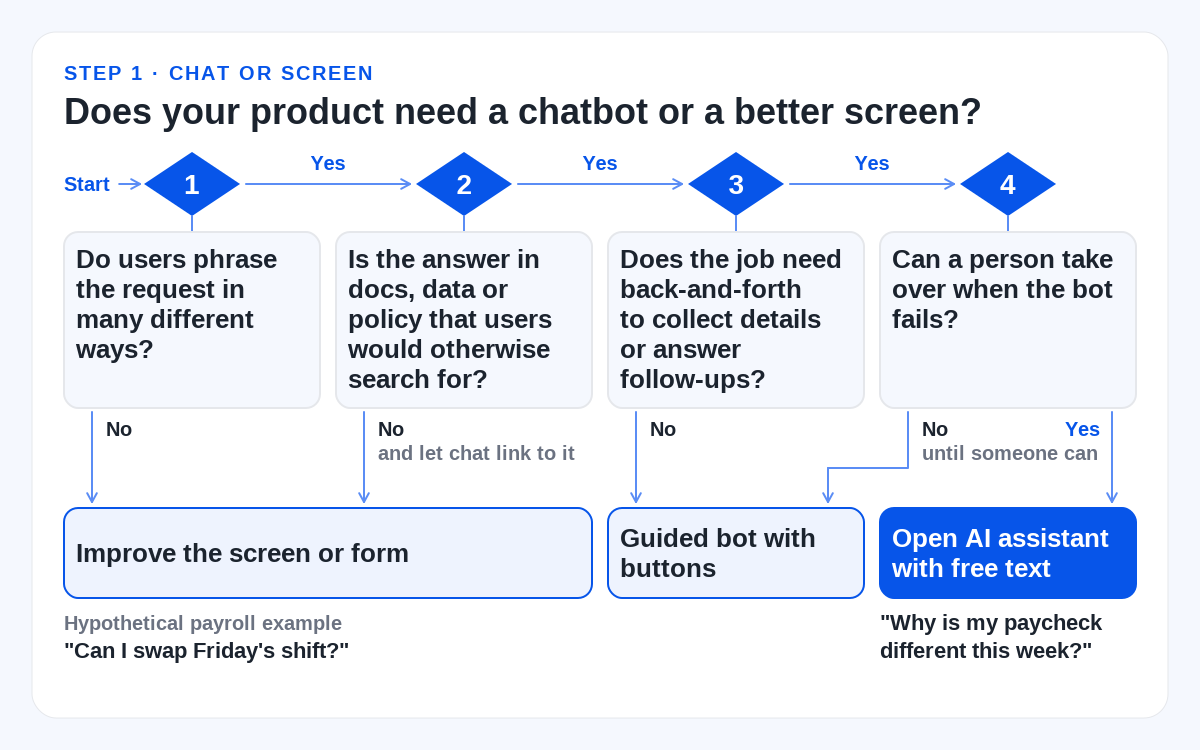
Start at question 1 and follow each answer.
- Do users phrase the request in many different ways? No: improve the screen or form. Yes: go to question 2.
- Is the answer in docs, data or policy that users would otherwise search for? No: improve the screen or form, and let chat link to it. Yes: go to question 3.
- Does the job need back-and-forth to collect details or answer follow-ups? No: guided bot with buttons. Yes: go to question 4.
- Can a person take over when the bot fails? No: guided bot with buttons until someone can. Yes: open AI assistant with free text.
Hypothetical payroll example: "Can I swap Friday's shift?" stays a screen; "Why is my paycheck different this week?" goes to the open AI assistant.
A guided support bot covers a known list of questions with buttons, while an AI assistant uses conversational AI to take open requests in free text. The two also differ in risk: a support bot can trap users in a loop, while an AI assistant can lead users to trust a wrong answer.
Either way, give it one entry point. Nielsen Norman Group (NN/g) recommends one bot that says what it is, handles what it can and passes the rest to people, not an AI chat beside a separate live chat.
Say you design a hypothetical payroll and scheduling SaaS for US restaurant groups. "Why is my paycheck different this week?" arrives in many phrasings, the answer sits in payroll records and the payroll team can step in, so it goes to an open AI assistant in a copilot panel beside the pay stub. "Can I swap Friday's shift?" is an action with two known fields, so it stays a screen and the assistant links to it.
Gate 1: pass when you can name the screen the bot replaces or the search it shortcuts. If chat wins, the next question is which jobs it takes first.
Step 2: Which jobs should the chatbot handle on day one?
Launch the chatbot with the few jobs that fill most of your real support chats or searches, each with a known answer source and owner, and park the rest.
I start from chat transcripts, where users' top questions and their exact words both sit. Each intent gets those trigger phrases and a fallback for the misses. If you design chatbot flows from a feature wishlist instead, the launch list ends up guessed.
Day-one scope stays small. Our published pricing puts a support widget with 20 to 30 intents on one website at the low end of the range. Five jobs answered well beat thirty jobs guessed at, so I write one card per job before any flow.
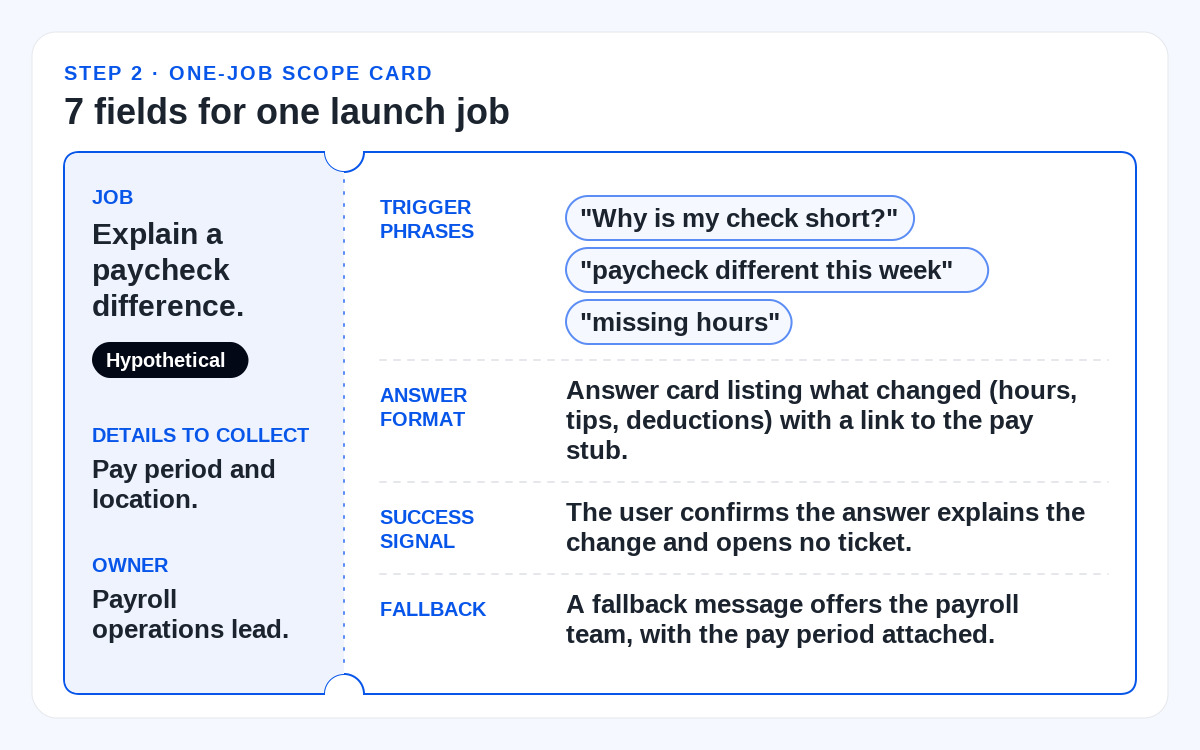
This hypothetical card fills the 7 fields for one launch job.
| Field | Example value |
|---|---|
| Job | Explain a paycheck difference. |
| Trigger phrases | "Why is my check short?", "paycheck different this week", "missing hours". |
| Details to collect | Pay period and location. |
| Answer format | Answer card listing what changed (hours, tips, deductions) with a link to the pay stub. |
| Success signal | The user confirms the answer explains the change and opens no ticket. |
| Fallback | A fallback message offers the payroll team, with the pay period attached. |
| Owner | Payroll operations lead. |
The launch list below ranks five jobs for the hypothetical product, using an example transcript ranking rather than real data.
| Job | Transcript rank (example) | Answer source | Decision |
|---|---|---|---|
| Explain a paycheck difference | 1. | Payroll records and pay stubs. | Launch. |
| Show the next pay date | 2. | The group's pay calendar. | Launch. |
| Explain tip pooling at a location | 3. | Each location's written tip policy. | Launch. |
| Swap a shift | 4. | The schedule screen. | Link to the screen, no chat answer. |
| Change the direct deposit account | 5. | Account settings with identity checks. | Later, and only through a person. |
The top three launch jobs become the starter prompts under the greeting message. NN/g found that helpful site chatbots state what they can do and suggest relevant prompts, so starter prompts double as the list of capabilities users see before they type.
Gate 2: pass when every launch job has an answer source and an owner. With the jobs fixed, write how each conversation goes, and how it goes wrong.
Step 3: How do you write the happy and repair paths?
Write each job's conversation twice: the happy path in as few turns as possible, then a repair path for every turn where the bot can misunderstand, stall or lack data.
The happy path opens with a greeting that says what the bot can do. It collects details through suggested replies instead of typing, answers in an answer card and offers the next step.
The repair path is where I spend most of my time. Google's conversation design guidance on errors, written for Google Assistant, says the first reprompt after a missed reply should be quick and should not repeat the original question word for word; later reprompts add detail. My repair strategy follows that ladder and caps it: after two failed turns, the bot offers a person. Every conversation flow I hand over has a repair line under each turn.
The table below shows one job, explaining a paycheck difference, in both lanes across 5 turns.
| Turn | Happy path | Repair path |
|---|---|---|
| 1. Greeting | "I'm the payroll assistant, an AI bot. I can explain pay changes, pay dates and tip rules." Three starter prompts follow. | An off-list question gets a restatement of what the bot covers and the prompts again. |
| 2. Pay period | Suggested reply chips: "This week", "Last week", "Pick a date". | An unclear reply gets a short reprompt: "This week or last week?" |
| 3. Location | Pre-filled from the profile with a one-tap confirm. | A user with several locations sees them as chips. |
| 4. Answer | An answer card lists what changed, with a link to the pay stub. | Missing payroll data gets a plain "not yet" plus the pay calendar or a person. |
| 5. Confirm | "Did that explain it?" with "Yes" and "Talk to payroll". | A second failed turn opens the handoff with the chat history attached. |
Keep each reply to one question per turn and a few short lines. A bot personality guide fixes the greeting, reply length and tone, which makes UX writing a team habit instead of one person's style.
Gate 3: pass when every turn has a repair line and no repair asks the same question twice. A rule-based chatbot stops there, but a large language model (LLM) chatbot adds a new problem: answers that sound right and are not.
Step 4: How does AI chatbot design show its sources?
AI chatbot design shows each answer's source, a plain-language confidence cue and a one-tap way to correct or reject it, so users check before they act.
An LLM writes a new answer each time, and a fluent answer can still be wrong. The Google People + AI Guidebook, written by Google's People + AI Research (PAIR) team, gives this its own chapter, "Errors + Graceful Failure", which asks product teams to define what counts as an error, find where errors come from and give users a path forward from failure.
For the hypothetical payroll assistant, answer grounding means tying every answer to a source in the user's own data. A source citation sits under the answer card as a source link ("Based on your pay stub for October 6–12"). When confidence is low, the bot offers a person instead of a guess. Feedback buttons and an edit or regenerate option let users correct the reply.
Trust is the center of AI product design, so in AI assistant design these parts are not extras. Our AI UX design team designs citations, source previews and plain-language confidence cues for AI features beyond chat too. That team plans for generation that takes 3 to 20 seconds, which is why I design a streaming response with a progress state instead of a bare spinner.
Gate 4: pass when every AI answer that can trigger an action shows its source. Sources cover the good answer; the next step covers every other state a reply can be in.
Step 5: Which states does every chatbot reply need?
In chatbot interaction design, every reply needs a designed state for streaming, a sourced answer, low confidence, refusal, error, offline and handoff, each ending in a clear next action.
A draft that stops at two states, typing and answered, leaves five states undesigned. The panels below draw one paycheck answer from the hypothetical product in all 7.
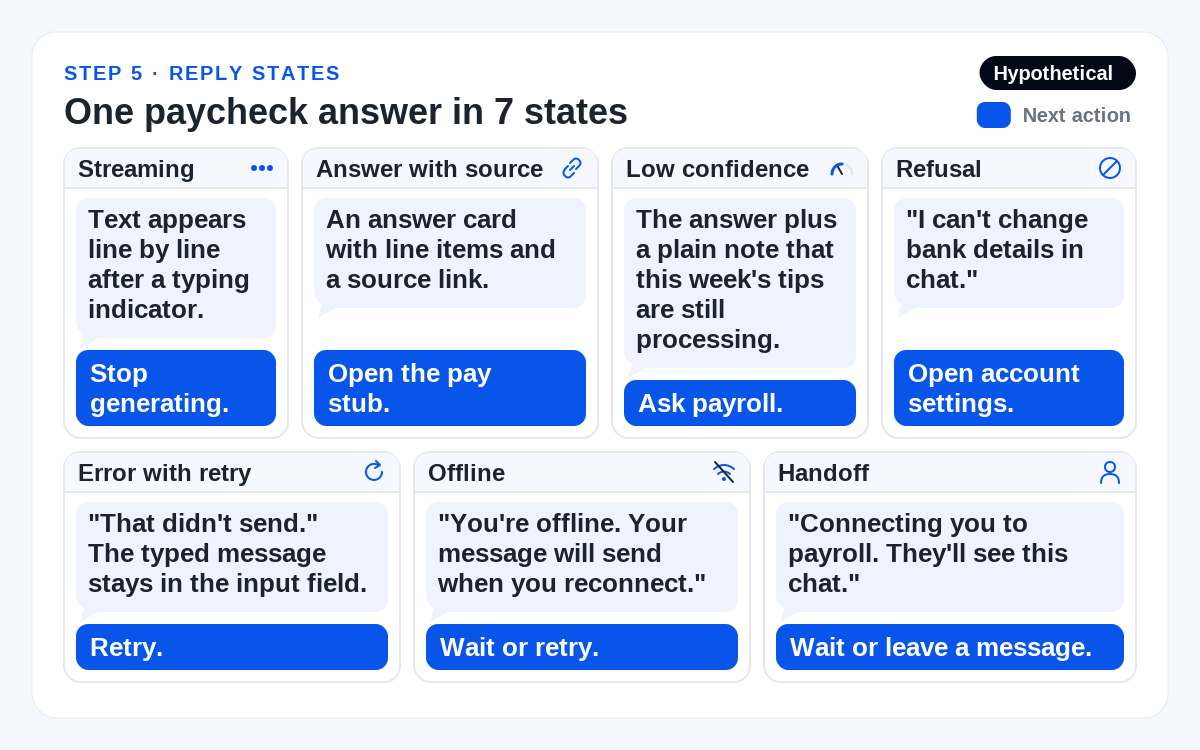
This hypothetical strip lists each reply state, what the user sees and the next action it offers.
| State | What the user sees | Next action |
|---|---|---|
| Streaming | Text appears line by line after a typing indicator. | Stop generating. |
| Answer with source | An answer card with line items and a source link. | Open the pay stub. |
| Low confidence | The answer plus a plain note that this week's tips are still processing. | Ask payroll. |
| Refusal | "I can't change bank details in chat." | Open account settings. |
| Error with retry | "That didn't send." The typed message stays in the input field. | Retry. |
| Offline | "You're offline. Your message will send when you reconnect." | Wait or retry. |
| Handoff | "Connecting you to payroll. They'll see this chat." | Wait or leave a message. |
A refusal state always names the next step, so a "no" never ends the conversation cold. An error keeps the user's typed message, so nobody has to retype a long question.
Counted only two states in your own bot? Our team designs the chat window, message components and system states such as typing, streaming, retry, error, refusal and offline for web, iOS and Android, or for an embedded widget. We test every conversation flow with real users before launch.
Gate 5: pass when no state ends without a next action. One of those states is a person.
Step 6: When should the chatbot hand off to a person?
Show a visible path to a person when users ask, after two failed turns or before a sensitive action, and pass the chat history so they never repeat themselves.
A chatbot without a handoff path traps the user who needed help most. So the handoff button sits in the chat from the first message, not only after failure. I write the human handoff triggers as an ordered list:
- The user asks for a person, in any words.
- The bot misreads two turns in a row.
- The topic touches a pay dispute, a legal question, health or closing an account.
- The user's messages turn angry or upset.
- The request arrives outside support hours, so the bot opens a ticket and shows when a reply is due.
Trigger 3 comes from consequence, not confusion. Microsoft's 2018 guidelines for responsible bots ask whether a situation needs people to provide judgment, expertise and empathy, and name employment, finances and health among the consequential areas.
The agent receives the job, the details collected, the bot's last answer and its source. In the hypothetical payroll product, a server disputing a short paycheck reaches the payroll team with the pay period already on screen.
Gate 6: pass when a tester can reach a person, or a ticket when no one is on shift, in two taps from any state. Next, protect users who cannot see the screen and users who need to know it is a bot.
Step 7: How do you make a chatbot accessible and lawful?
Accessible chatbot design meets Web Content Accessibility Guidelines (WCAG) 2.2 Level AA, and lawful design says plainly that users are talking to a bot.
Three WCAG checks carry most of the weight in a chat window: contrast, announced messages and keyboard use. Success criterion (SC) 1.4.3 sets minimum contrast at 4.5:1 for message text and 3:1 for large text. Our chat windows target at least 4.5:1 for message text, and I check gray timestamps and placeholder text first.
SC 4.1.3 Status Messages, added in WCAG 2.1 and kept in 2.2, covers notices like "typing", progress and errors. Status messages must be exposed so a screen reader announces them without moving focus. Streaming text floods a screen reader if every chunk is announced, so I announce the finished answer once. Focus stays in the input field after each send, and every chip works from the keyboard.
In the US, the Section 508 standards point to WCAG 2.0 AA, and the Americans with Disabilities Act (ADA) Title II rule for state and local governments points to WCAG 2.1 AA. The World Wide Web Consortium (W3C) states that content meeting WCAG 2.2 also meets 2.0 and 2.1, so I design to 2.2 AA. Read this step as design guidance, not legal advice.
The California bot disclosure law, Senate Bill (SB) 1001, sits in Business and Professions Code §17940 and the sections after it and became operative on July 1, 2019. It bars using a bot to mislead a person in California about its artificial identity to drive a sale or influence a vote, and a clear and conspicuous disclosure avoids that liability. The law does not say where the disclosure goes, so the first line of the greeting is my design choice: the payroll assistant says it is an AI bot there, as in Step 3.
Gate 7: pass when a screen reader user can send a message, hear the answer and reach a person, and the greeting says it is a bot. Now prove it works with people.
Step 8: How do you test chatbot design before launch?
Test chatbot design by giving real users your launch jobs as tasks in a prototype, then scoring each transcript against pass thresholds you wrote before the sessions.
In our conversation testing step, users work through real tasks in a clickable prototype while we count task success and turns per task. I build that prototype in Figma and write every threshold before the first session, so a weak result cannot be renamed a pass afterward.
AI answers need real model output in the prototype, wrong answers included. In our AI feature tests, 5 to 8 users run real tasks in a prototype that shows real model answers, and we measure how often they accept, edit or reject each answer. Each transcript then gets scored against its threshold, as in the example below.
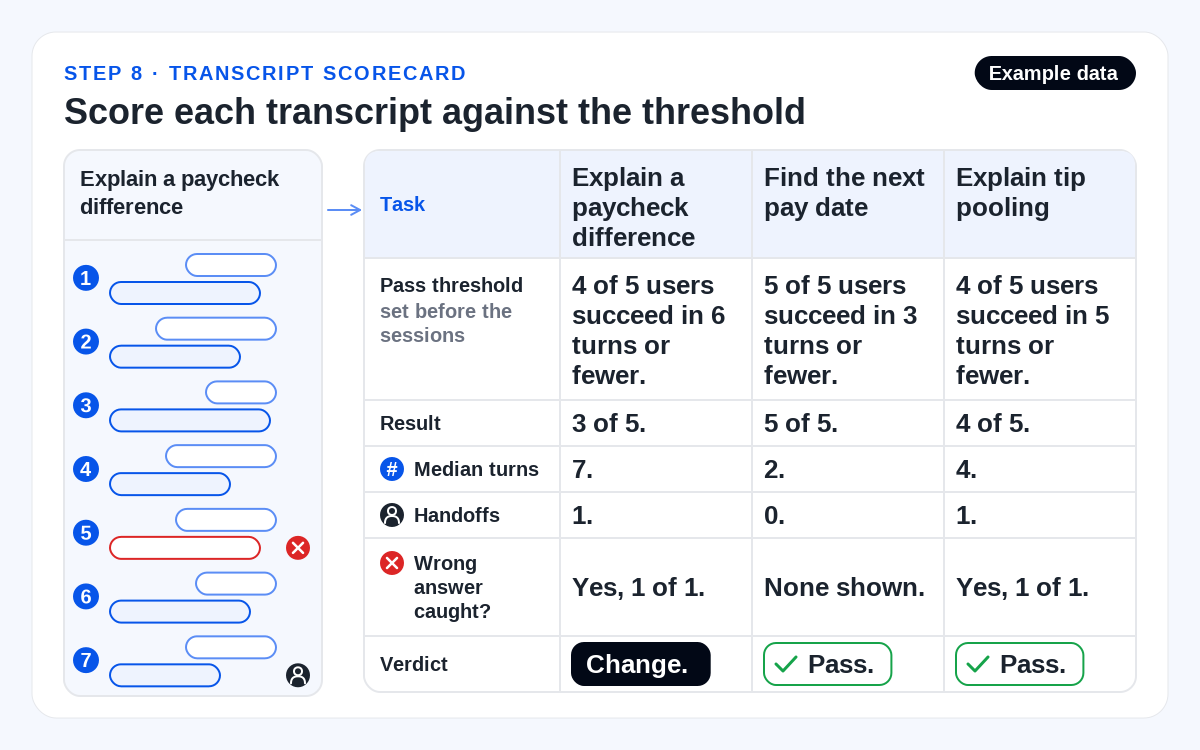
This illustrative scorecard uses example data from 5 users; the team set each threshold before the sessions.
| Task | Pass threshold | Result | Median turns | Handoffs | Wrong answer caught? | Verdict |
|---|---|---|---|---|---|---|
| Explain a paycheck difference | 4 of 5 users succeed in 6 turns or fewer. | 3 of 5. | 7. | 1. | Yes, 1 of 1. | Change. |
| Find the next pay date | 5 of 5 users succeed in 3 turns or fewer. | 5 of 5. | 2. | 0. | None shown. | Pass. |
| Explain tip pooling | 4 of 5 users succeed in 5 turns or fewer. | 4 of 5. | 4. | 1. | Yes, 1 of 1. | Pass. |
After launch I read chat transcripts every week. Containment rate, the share of conversations closed without a person, also rises when users simply give up, so I read it beside task success rate and the handoff count.
Is one launch job still missing its threshold after a second round, with no clue in the transcripts? That is a good moment to bring the transcripts and the scorecard to our team.
Gate 8: pass when every launch job meets its threshold in the last round. The checklist below puts all 8 gates on one page.
The 8-gate chatbot design checklist
The chatbot design process passes only when all 8 gates pass; a failed gate sends you back to that step, not forward to launch.
The table below collects the gate from each step, the question it asks and what a pass looks like.
| Step | Gate question | Pass when |
|---|---|---|
| 1. Chat or screen | Does chat beat a screen for this job? | You can name the screen the bot replaces or the search it shortcuts. |
| 2. Launch jobs | Is every launch job backed? | Every launch job has an answer source and an owner. |
| 3. Paths | Can every turn recover? | Every turn has a repair line and no repair asks the same question twice. |
| 4. Sources | Can users check AI answers? | Every AI answer that can trigger an action shows its source. |
| 5. Reply states | Does every state lead somewhere? | No state ends without a next action. |
| 6. Handoff | Can users reach a person fast? | A tester reaches a person, or a ticket when no one is on shift, in two taps from any state. |
| 7. Access and law | Can everyone use it, and does it say it is a bot? | A screen reader user can send, hear the answer and reach a person, and the greeting says it is a bot. |
| 8. Testing | Did the last round pass? | Every launch job meets its threshold in the last round. |
The best chatbot design is the one users finish a task with in the fewest turns, and each gate protects that. For shipped versions of each one, see what 7 real products get right and wrong. If you are designing a chatbot now, copy the 8 rows into your sprint board and mark each one pass or fail. When you want a team to design and test your assistant with you, ours starts from your transcripts.
If you run only one gate this week, run gate 1, because a better screen beats a bot nobody needed.
FAQs
What are the four types of chatbots?
Teams usually group chatbots by how they read input: menu bots driven by buttons, rule-based bots that match keywords, intent-based bots trained on example phrases and generative assistants built on an LLM. A frequently asked questions (FAQ) bot or a lead qualification bot is usually one of the first two.
How do UI and UX split the work on a chatbot?
UX design decides what the bot says, which actions it offers and when a person takes over, while UI design decides how that dialogue looks on screen. IBM draws the same line. Both halves of this user experience design work read the same transcripts, so I keep them with one designer.
What are the core chatbot design principles?
Chatbot design principles fit in one line each: say what the bot can do, keep replies short, offer suggested replies, show sources for AI answers, repair before you repeat, offer a person after two failed turns and announce new messages to screen readers. The 8-gate checklist turns four of them into pass-or-fail tests.
How long does it take to design a chatbot?
With our team it takes 3 to 8 weeks across transcript review, flow design, interface design and conversation testing. The number of intents, channels and languages sets where a project falls in that range.
How much does it cost to design a chatbot?
Our published range is $15,000 to $60,000, driven by the number of intents, channels and languages. A one-website support widget sits near the low end and an assistant across a web app and a mobile app near the high end; see what chatbot interface design costs with our team.
Can I build my own AI chatbot without a designer?
Yes. Builder tools give you a chat window, and the 8 gates cover how to design a chatbot inside it. Repair paths, sourced AI answers, handoff context and screen reader announcements are still yours to design, so test gates 3, 4, 6 and 7 hardest before launch.