

Chatbot UI design
Chatbot UI design that keeps conversations short, clear and useful
Message layouts, suggested replies, rich answer cards and a clean handoff to a human, designed for web, mobile and in-app chat.
In short
Chatbot UI design is the user interface (UI) design of a chat window: the message layout, input area, suggested replies, answer cards and states for typing, errors and handoff. Our team at ui-ux.agency designs chatbot interfaces for AI assistants and support bots in 3 to 8 weeks, and tests every conversation flow with real users before launch.
Trusted by teams at




- Senior designers only
- NDA before the first call
- Reply within 1 business day
Get a free consultation
Free consultation · reply within one business day
What is chatbot UI design?
Chatbot UI design decides how a conversation looks and behaves: where messages sit, how users type or tap, and how the bot shows results that plain text cannot hold. It covers the visual interface and the conversation flow together.
A good chatbot interface does more than show bubbles. It shows a product as a card with a price and a button, a booking as a calendar, and a long answer as short steps. It tells users what the bot can do before they type. Chatbot UI design is one part of the wider user experience (UX) of an AI product; the rest of that work sits with our AI UX design agency team.
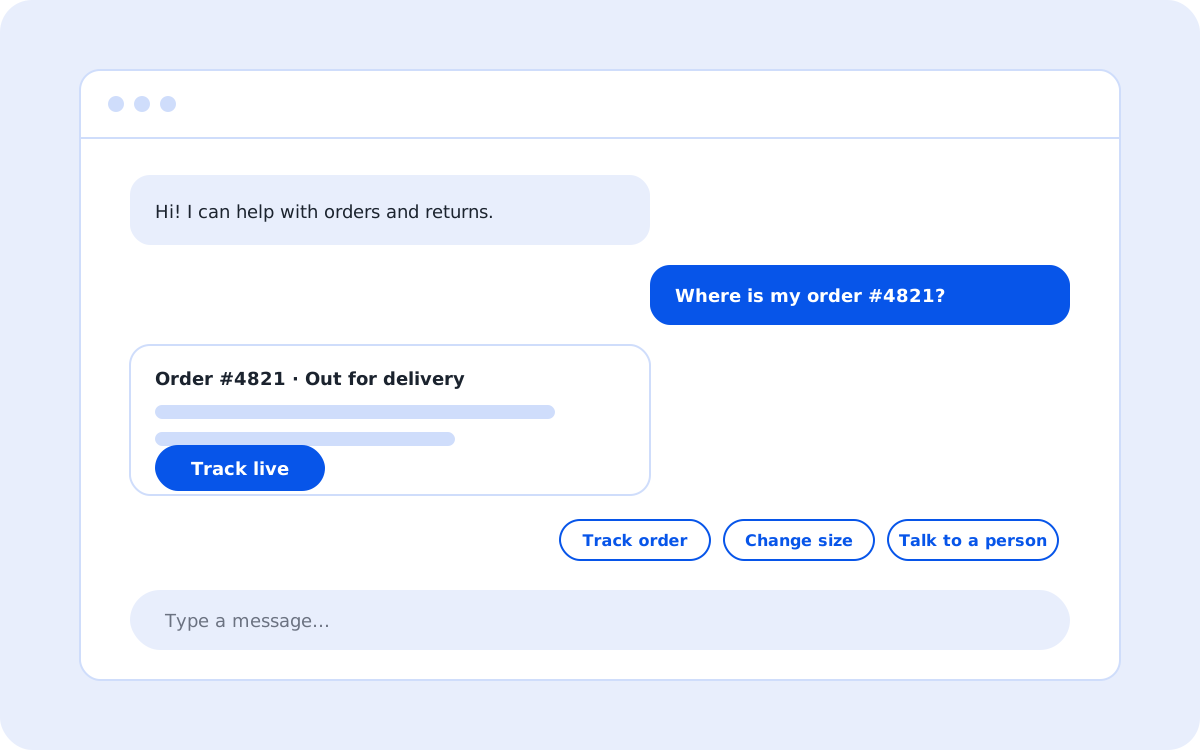
- Bot greeting: "Hi! I can help with orders and returns."
- User question: "Where is my order #4821?"
- Answer card: Order #4821, out for delivery, with a Track live button
- Suggested reply chips: Track order, Change size, Talk to a person
- Message input: "Type a message…"
- Investment
- $15,000–$60,000
- Deliverables
- 6 included
What does our chatbot UI design include?
Our chatbot UI design includes 6 parts:
Conversation map
Every intent, branch and fallback, drawn before any screen is designed.
Message components
Text, cards, carousels, forms, file previews and quick-reply chips, built as a reusable library.
Input design
Text input, voice input, attachments and suggested prompts that show what the bot can do.
System states
Typing, streaming, retry, error, refusal and offline states, each with a clear next action.
Human handoff
A visible path to a person, with the chat history passed along so users never repeat themselves.
Bot personality guide
Tone, message length and greeting rules that keep every reply consistent.
How does the chatbot UI design process work?
The chatbot UI design process runs in 4 steps over 3 to 8 weeks.
- 1 week
Transcript review
We read real support chats or search logs to find the top questions and the words users actually use.
- 1–2 weeks
Flow design
We map intents, answers, fallbacks and handoff rules, then agree them with the support and engineering teams.
- 1–3 weeks
Interface design
We design the chat window, components and states for web, iOS and Android, or for an embedded widget.
- 1–2 weeks
Conversation testing
Users complete real tasks with a clickable prototype; we measure task success and the number of turns per task.
Chatbot UI design for support bots vs AI assistants
A support bot answers a known set of questions; an AI assistant handles open requests. Chatbot UI design changes with that difference.
| Criterion | Support bot | AI assistant |
|---|---|---|
| Main goal | Resolve a ticket without an agent | Help with open tasks inside a product |
| Input style | Buttons and short text | Free text, files and voice |
| Answer format | Help articles and forms | Generated text, tables and drafts |
| Key risk | Users get stuck in a loop | Users trust a wrong answer |
| Key metric | Containment rate and CSAT | Accepted answers and task time |
Which chatbot UI design mistakes do we fix most?
Chatbot UI design audits find the same 4 mistakes again and again.
Walls of text
Long replies hide the answer. We split answers into short steps, cards and links.
No escape
Users cannot reach a person. We add a visible handoff option after two failed turns.
Hidden abilities
Users do not know what to ask. We add starter prompts and a short welcome message.
Lost context
The bot forgets earlier answers. We design memory cues and an editable summary of the request.
How much does chatbot UI design cost?
Chatbot UI design costs $15,000 to $60,000 and takes 3 to 8 weeks. The range depends on the number of intents, channels and languages.
A support widget with 20 to 30 intents on one website sits near $15,000. An AI assistant inside a web app and a mobile app, with file uploads and rich answer cards, sits near $60,000. Chat often ships as part of a larger SaaS design agency project; see the UI UX design cost guide for full ranges.
Typical investment$15,000–$60,000
- Conversation map
- Message components
- Input design
- System states
FAQ
Chatbot UI design FAQs
Short answers to common questions about chatbot UI design.
Still have a question?
A design lead answers every message within one business day.
Talk to a design leadDo you design the bot's answers as well as the interface?
Yes. We write the greeting, fallback, error and handoff messages, and we give the content team a tone guide for every other reply.
Can you redesign a chatbot that is already live?
Yes. We start with transcripts and analytics from the live bot, then fix the flows with the highest drop-off first.
Which platforms does your chatbot UI design cover?
Website widgets, in-app chat for web apps, iOS and Android apps, and messaging channels such as WhatsApp and Slack.
Does chatbot UI design include accessibility?
Yes. Every chat window supports keyboard use, screen readers and color contrast of at least 4.5:1 for message text.
Not sure where your design loses users?
Book a 45-minute product review. A senior designer walks through your product and names the three changes with the biggest effect.
Book a product review





Ready to launch faster and convert more users?
Send us your project. A design lead reviews it and schedules a call within one business day. We sign an NDA before the first technical discussion if you prefer.