Key takeaways
- Automate moments that are frequent, the same for the whole segment and cheap to get wrong; route the rest to a person.
- Every rule has 6 parts: trigger, segment, message job, channel, exit or suppression, and a frequency cap.
- Behavior-based triggers come first; a time-based fallback catches only users who never produce the event.
- Prove lift against a holdout group that gets no automated messages, then check each rule for dismissals and complaints.
- A rule that explains a confusing screen is a patch, and the fix belongs in the screen.
Here's a user onboarding automation rule from a hypothetical US revenue-analytics software as a service (SaaS) product. "When a trial is 3 days old and the setup checklist is under half done, send 'Need a hand getting started?'" User onboarding automation is that kind of rule at scale: logic that watches what new users do and sends the next nudge without anyone picking each message.
This rule fired on the account's most active user. In this example, the admin connected the company's data warehouse within 20 minutes of sign-up. She used the application programming interface (API), not the setup screen.
That path sent no event, so the checklist still read 1 of 4 steps done. The email asked an expert whether she needed a hand.
I'm Talha Saleem, a senior user interface (UI) and user experience (UX) designer at ui-ux.agency. We're the design team of tkxel, and we've designed 200+ products since 2017.
When I review rules like this one, the copy is rarely the problem. The problem is a rule nobody checked against its events, or a rule patching a screen that needed fixing. That second case is why our SaaS onboarding design work redesigns the screens and the guidance on top of them together.
Below: what to automate, how a rule is built, when email or a person takes over, where artificial intelligence (AI) helps, how to prove lift and when automation hurts.
What is user onboarding automation (and what isn't)?
User onboarding automation turns product events into guidance: each rule reads a new user's actions and sends one next step, in the app, by email or through a person.
In practice it's rule-based onboarding. Search results for the phrase mix in 3 other jobs, so I rule them out first:
- Employee onboarding: human resources (HR) and information technology (IT) teams set up accounts, equipment and paperwork for new hires. It's an internal process with its own tools.
- Client onboarding in financial services: identity checks and account opening, which is compliance work rather than product guidance.
- Tenant provisioning: engineering creates a new customer's environment and admin account, and no user ever sees it.
What gets automated is the layer on top of the product. That layer holds in-app guidance (checklists, tooltips, short tours, empty-state prompts), automated onboarding emails and alerts that route a user to a person. Sign-up, setup and empty states sit under every rule, and a rule can only point at them.
In a product-led growth model, a trial user can reach first value without talking to anyone, so these rules carry much of the guidance. The screens under them still decide how much a rule has to explain, so we redesign sign-up, setup, empty states and in-app guidance as one job. I'd rather fix a screen than write a rule that explains it.
For the full path from a new account to the first real result, including how to pick an activation event, start with our SaaS onboarding guide. This post stays on the rules. The real question isn't how to automate, but which moments deserve it.
Which onboarding moments should you automate?
Automate moments that happen often, need the same next step for everyone in a segment and cost little when wrong; keep a person where context, account value or trust decides.
I sort every onboarding moment on 2 questions before anyone opens a tool. How often does it happen in the first 7 days? And what does a wrong message cost: a shrug, a lost afternoon or a lost account?
Automated user onboarding works best when the first answer is "often" and the second is "a shrug." Volume pays for the rule, and mistakes stay cheap. The other quadrants need a fallback, a person or both. Every quadrant except keep human still uses automation, if only to flag the moment for someone.
The matrix below places 10 moments from the hypothetical analytics product in 4 quadrants.
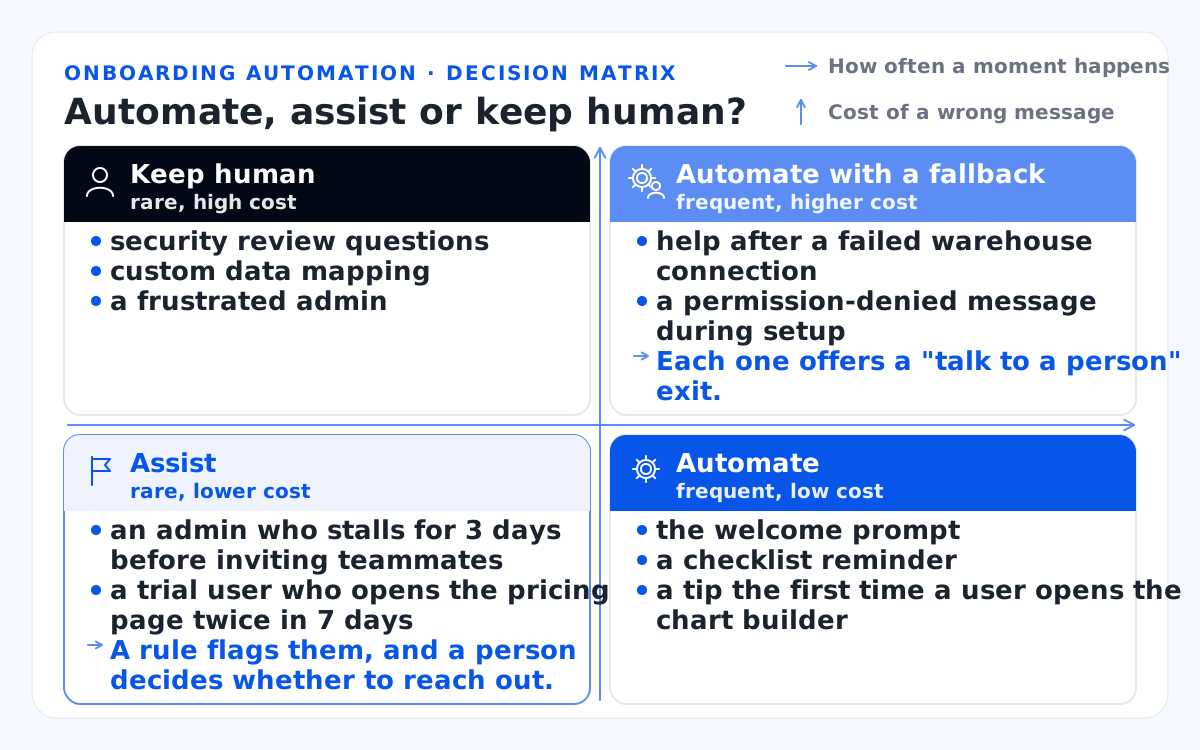
- Axes: how often a moment happens and the cost of a wrong message.
- Automate (frequent, low cost): the welcome prompt, a checklist reminder, a tip the first time a user opens the chart builder.
- Automate with a fallback (frequent, higher cost): help after a failed warehouse connection and a permission-denied message during setup. Each one offers a "talk to a person" exit.
- Assist (rare, lower cost): an admin who stalls for 3 days before inviting teammates, a trial user who opens the pricing page twice in 7 days. A rule flags them, and a person decides whether to reach out.
- Keep human (rare, high cost): security review questions, custom data mapping, a frustrated admin.
On the human side, I route a moment to a person in 3 cases. The account is high-fit, the user is stuck on something only context can solve, or a wrong message would cost trust or data.
Now the trap: automating a moment because the tool makes it easy. A tour builder makes a long tour quick to publish, which says nothing about whether users need it. Place your 10 busiest moments on the matrix first. Once a moment earns automation, it becomes a rule, and a rule has parts.
What makes up one user onboarding automation rule?
Every user onboarding automation rule has 6 parts: a trigger event, a segment, a message job, a channel, an exit or suppression condition, and a frequency cap.
I write each rule as one plain sentence before anyone builds it, then split the sentence into those 6 parts. The user segment decides who qualifies, and segments also drive role-based onboarding paths for admins and analysts.
The blueprint below breaks one rule from the hypothetical analytics product into its 6 parts.
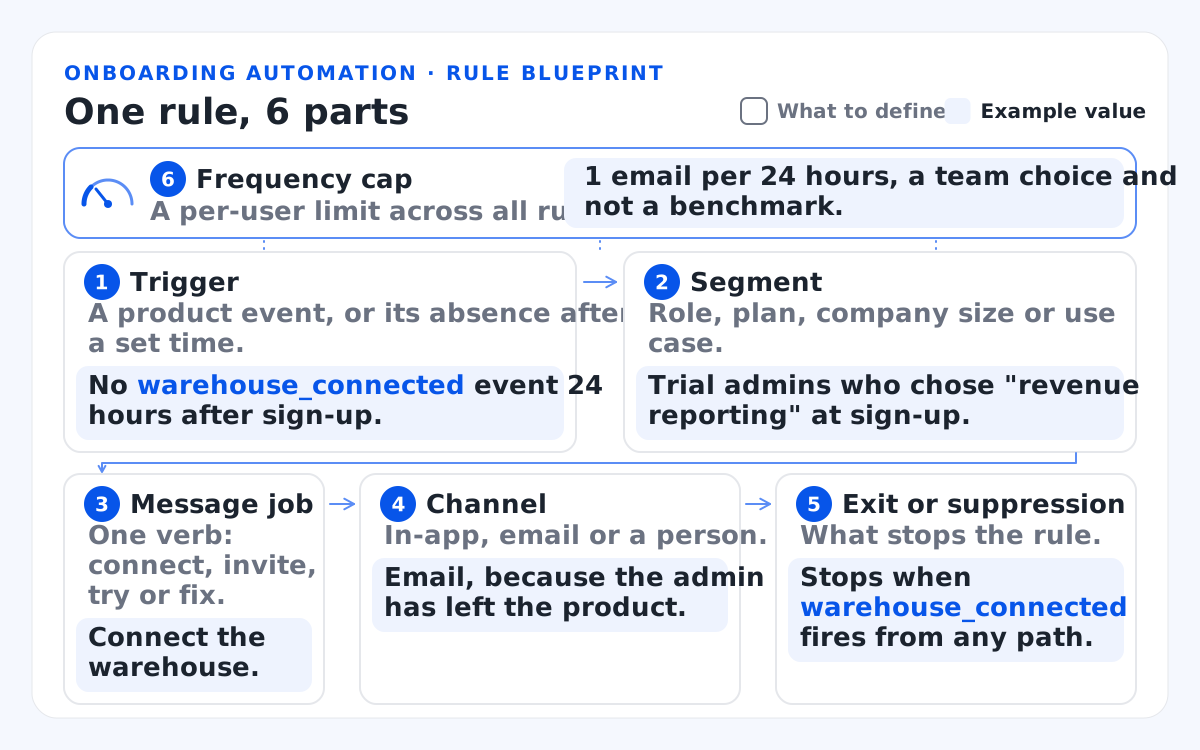
This table defines each part of a rule and gives one example value.
| Part | What to define | Example value |
|---|---|---|
| Trigger | A product event, or its absence after a set time. | No warehouse_connected event 24 hours after sign-up. |
| Segment | Role, plan, company size or use case. | Trial admins who chose "revenue reporting" at sign-up. |
| Message job | One verb: connect, invite, try or fix. | Connect the warehouse. |
| Channel | In-app, email or a person. | Email, because the admin has left the product. |
| Exit or suppression | What stops the rule. | Stops when warehouse_connected fires from any path. |
| Frequency cap | A per-user limit across all rules. | 1 email per 24 hours, a team choice and not a benchmark. |
Behavior-based triggers come first. A behavior trigger fires on what the user does, such as opening the chart builder, so the message lands mid-task. Triggered onboarding beats a calendar because it follows the user's pace.
A time-based fallback fires only when the expected event never arrives inside its window, such as 24 hours. A pure time rule fires at 24 hours even for a user who finished in 5 minutes on another device.
A suppression rule skips anyone who already did the step, by any route. Each rule's segment condition and exit condition are only as good as the event tracking plan behind them. Those product analytics events usually live in Mixpanel or Amplitude.
The intro's misfire came from a missing event: the API path never sent warehouse_connected, so the suppression rule had nothing to read. Before I write a rule, I check that every path to the step fires the same event.
Onboarding tools model rules the same way. Userpilot's documentation describes segments built from user data, company data and event conditions, which then serve as audiences for in-app flows. The same logic can live in your own code. List every path to your next milestone and confirm each one fires its event, then turn to the channel closest to the action: the app itself.
How do you design in-app guidance users don't dismiss?
In-app guidance gets used when it appears at the moment of the task it explains, offers one action, closes in one click and retires once the user succeeds.
When in-app engagement for user onboarding fails, I check the timing before the copy. In its article on help and documentation, Nielsen Norman Group (NN/g) splits proactive help into push and pull revelations. Push revelations appear whether or not they relate to the user's current task, such as tips shown when an app launches. Pull revelations are contextual and relate to the task the user is working on right now.
I turn that idea into behavior-triggered in-app guidance, with one trigger per guidance type:
- Onboarding checklist: visible for the whole trial, with the same 3 to 6 steps as your milestones. Each item ticks off on an event, and the checklist ends at activation.
- Tooltip: Esc to dismiss it, shown on the first visit to a control, never on page load.
- Short product tour: 3 steps or fewer, reserved for one new feature and started only when the user asks for it.
- Empty-state prompt: shown when a screen has no data yet, pointing to the one action that fills it.
Every guide I design gets a retire rule. In this example, a tooltip or tour stops after the user succeeds, after a number of dismissals your team picks, or 7 days after it first appears; the checklist retires at activation. It gets a way back too: a help-menu entry, so a dismissed guide is never lost. In our onboarding work, we rate a product tour's effect on activation as small and a guided first task's as direct.
Accessibility belongs in the trigger design, not in a later audit. I design to Web Content Accessibility Guidelines (WCAG) 2.2 AA. It's the standard I use as the US frame for the Americans with Disabilities Act (ADA) and Section 508. WCAG 2.2 has 2 success criteria (SC) that apply to guidance directly:
- SC 1.4.13 Content on Hover or Focus: a tooltip must be dismissible without moving the pointer or focus, unless it reports an input error or covers no other content. If hover shows it, it must be hoverable. It must stay persistent until the trigger is removed, the user dismisses it or its information is no longer valid.
- SC 2.4.11 Focus Not Obscured (Minimum): in the W3C's Understanding WCAG 2.2 notes, a control that receives keyboard focus must not be entirely hidden by author-created content, such as a tour popover or a sticky banner.
Users closing your tooltips on sight? Our onboarding redesigns cover in-app guidance together with the screens beneath it. In-app guidance reaches only people who are in the app, and when they leave, email takes over.
When should automated onboarding emails take over?
Automated onboarding emails should take over only after the user leaves the product, carry the same next step the in-app guide showed, and stop when that step is done.
Fixed automated email sequences for user onboarding go stale the day a user moves ahead of them. A user who connects the warehouse in 10 minutes still gets the "connect your warehouse" email 2 days later, unless a rule suppresses it. A trial nurture sequence on a fixed calendar makes that mistake by design. So I treat state as the plan and time as the fallback.
Say the warehouse email waits 24 hours, and a second reminder waits 3 more days. Both stop the moment the connection event fires. That's an example timing, not a benchmark.
The relay below passes each user between channels by state, using example timings rather than benchmarks, with one shared gate that stops every channel once the step is done.
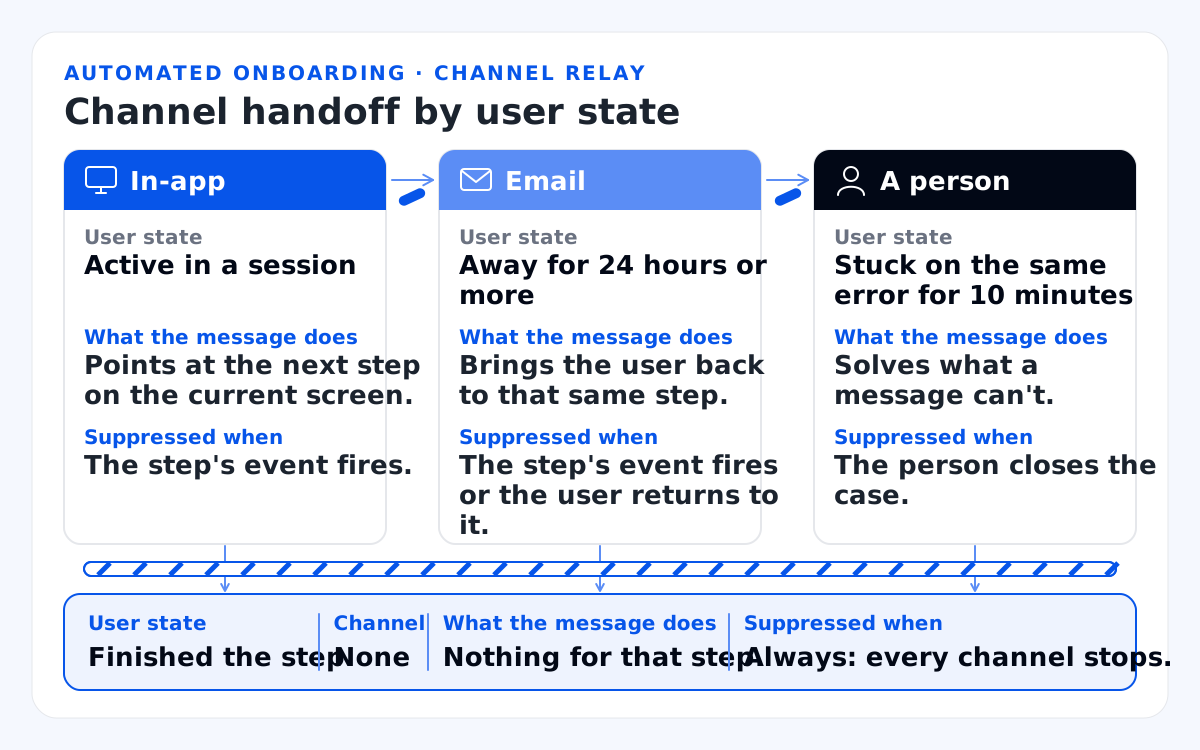
This table maps each user state to its channel, the message's job and what suppresses it.
| User state | Channel | What the message does | Suppressed when |
|---|---|---|---|
| Active in a session | In-app. | Points at the next step on the current screen. | The step's event fires. |
| Away for 24 hours or more | Email. | Brings the user back to that same step. | The step's event fires or the user returns to it. |
| Stuck on the same error for 10 minutes | A person. | Solves what a message can't. | The person closes the case. |
| Finished the step | None. | Nothing for that step. | Always: every channel stops. |
One suppression list shared across channels keeps a user from getting the in-app prompt and the email for the same step. If your emails run in a marketing automation platform, connect it to the same product events. The broader guide shows how to map each onboarding email to the screen it opens, so I won't rebuild that table here.
These emails answer to 2 rule sets: a US law and Gmail's sender policy. The first is the Controlling the Assault of Non-Solicited Pornography and Marketing (CAN-SPAM) Act of 2003. The CAN-SPAM Act sorts an email by its primary purpose.
The Federal Trade Commission (FTC) compliance guide explains that the law covers any email whose primary purpose is the commercial advertisement or promotion of a commercial product or service. Commercial email needs a working opt-out. You must honor an opt-out request within 10 business days.
The FAQs below cover how that applies to onboarding emails. This is not legal advice, so ask your counsel.
The second is Google's Gmail email sender guidelines, which set the technical bar. Google's sender guidelines FAQ defines a bulk sender as one that sends close to 5,000 or more messages to personal Gmail accounts in 24 hours, and that status is permanent once reached.
Bulk senders set up Sender Policy Framework (SPF), DomainKeys Identified Mail (DKIM) and Domain-based Message Authentication, Reporting and Conformance (DMARC). They offer one-click unsubscribe on marketing and subscribed messages, and Google's subscription guidelines ask senders to honor unsubscribe requests within 48 hours. They keep the spam rate in Postmaster Tools below 0.3%. Gmail stepped up enforcement in November 2025, including rejections for mail that fails these rules.
The design consequence: fewer emails, each fired by behavior, keep complaints down. That protects the password resets and invites that must arrive.
A user who can unsubscribe from onboarding emails in one click has less reason to press "report spam." If you also sell in the European Union (EU), the General Data Protection Regulation (GDPR) adds consent rules. Count your emails per user per 7 days before adding another, because some users need a person instead.
When should user onboarding automation hand off to a person?
User onboarding automation should hand off to a person when a high-fit account stalls, when product use crosses your product-qualified lead (PQL) threshold, or when the user asks.
TechTarget defines a PQL as a person or business that has experienced value from a product through first-hand use. That use can come from a free trial, a limited-feature version or other first-hand experience.
I set the product-qualified lead threshold just past your activation event, never from a published conversion rate. Every product defines activation differently. An illustrative threshold for the analytics product: 3 users invited and 2 reports shared within 14 days.
Admins of high-fit accounts are the usual handoff candidates, since invited members land in a workspace someone already set up. A customer success manager (CSM) takes their setup problems, and sales takes the accounts that cross the PQL line. That split is sales-assisted onboarding, with automation doing the watching.
The ladder below climbs from automation alone to a person, with the owner of each rung; the timings on rungs 2 and 3 are examples, not benchmarks.
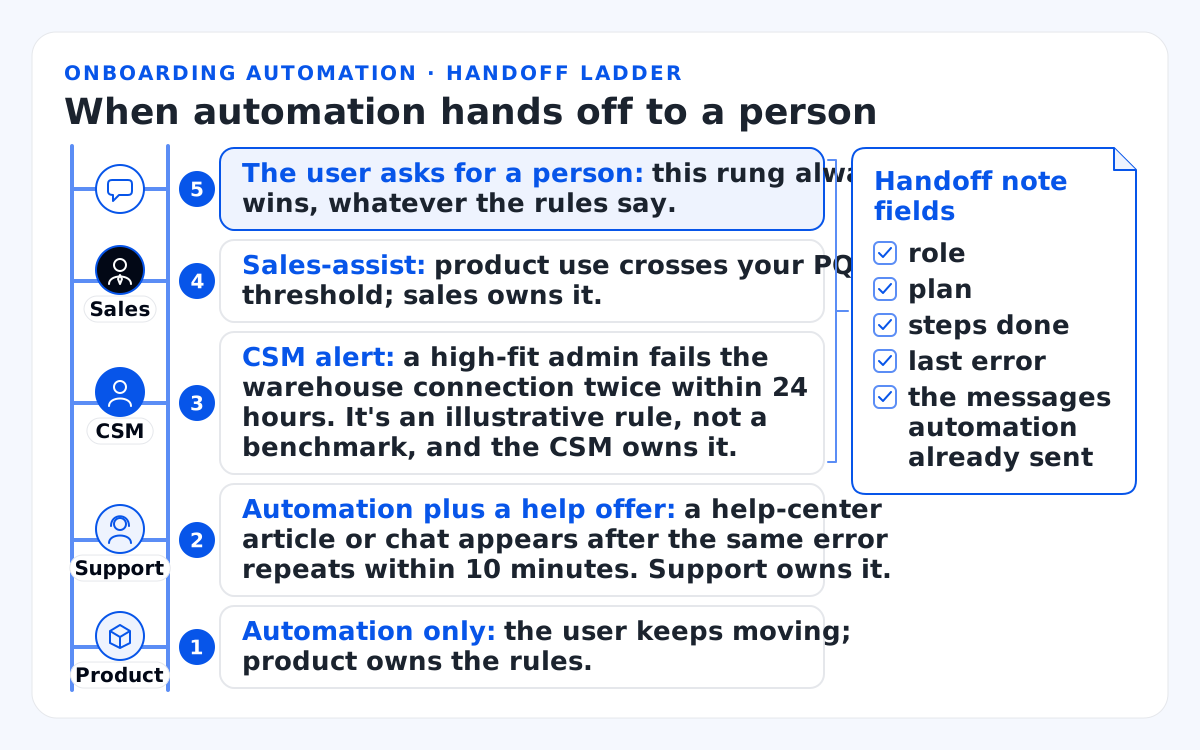
- Automation only: the user keeps moving; product owns the rules.
- Automation plus a help offer: a help-center article or chat appears after the same error repeats within 10 minutes. Support owns it.
- CSM alert: a high-fit admin fails the warehouse connection twice within 24 hours. It's an illustrative rule, not a benchmark, and the CSM owns it.
- Sales-assist: product use crosses your PQL threshold; sales owns it.
- The user asks for a person: this rung always wins, whatever the rules say.
Handoff note fields: role, plan, steps done, last error and the messages automation already sent.
A sales-assist handoff fails when the person starts cold. I design the handoff note as part of the rule, and I aim for a note a rep reads in 30 seconds.
When sales accepts the handoff, automation pauses every onboarding rule for that user. The person and the bot then don't talk over each other. Write your 5 rungs with a named owner on each before you build a single alert. More teams now put an AI assistant between the user and that person.
Where does AI fit in user onboarding automation?
AI fits in user onboarding automation as an assistant that answers setup questions in plain words, if it states its limits and hands off to a person fast.
An AI onboarding assistant answers questions like "how do I connect BigQuery?" in plain language. AI user onboarding assistants suggest the next step from the user's own data, and they draft the CSM's handoff note. Where they shouldn't act alone: permissions, billing, data deletion and anything in the keep-human quadrant of the matrix above.
Google's People + AI Research (PAIR) team gives the design rule in the Mental Models chapter of its People + AI Guidebook. Onboard in stages, and explain what the AI can do, what it can't do, how it is likely to change and how users can improve it. The chapter warns that mismatched mental models lead to unmet expectations, frustration, misuse and product abandonment.
An AI assistant with no route to a person turns one wrong answer into a lost trial. In our chatbot UI design work, we add a visible handoff option after two failed turns. The chat history is passed along so users never repeat themselves.
If your product is itself AI, onboarding sets expectations about its answers before users rely on them. One way: a sample answer that shows its limits in the user's first 10 minutes. Write the assistant's handoff condition into your rule sheet like any other rule.
How do you design an automated onboarding flow?
Design an automated onboarding flow in 6 steps: name milestones, map stalls, write rules, prototype messages on real screens, test with new users and release behind a holdout.
- Name 3 to 6 milestones up to your activation event, such as warehouse connected, first chart saved and first report shared.
- Map the stall points between milestones from the last 30 days of analytics and session recordings, so every rule answers a real drop-off.
- Write one rule per moment in the rule sheet below, as one sentence first.
- Prototype the messages on the real screens, with dismissed, finished and error states. I prototype every tooltip on the screen it sits on, never in a slide deck.
- Test with people new to the product. I'd put the messages in front of at least 5 users who have never seen the product. In our onboarding projects, we talk to 5 to 8 recent sign-ups, both activated and lost, about what they expected. We test the prototype with new users too.
- Release in stages behind a holdout group, a few rules at a time. I keep each batch live for at least 1 month before adding the next, and I read activation only for users who signed up at least 14 days earlier.
The onboarding automation rule sheet is the template I'd fill in before building anything. Each rule fills one column, and its last row asks whether the rule is patching a screen.
The worksheet below lists 9 fields as rows, with 2 hypothetical rules filled in and 4 blank columns for yours.
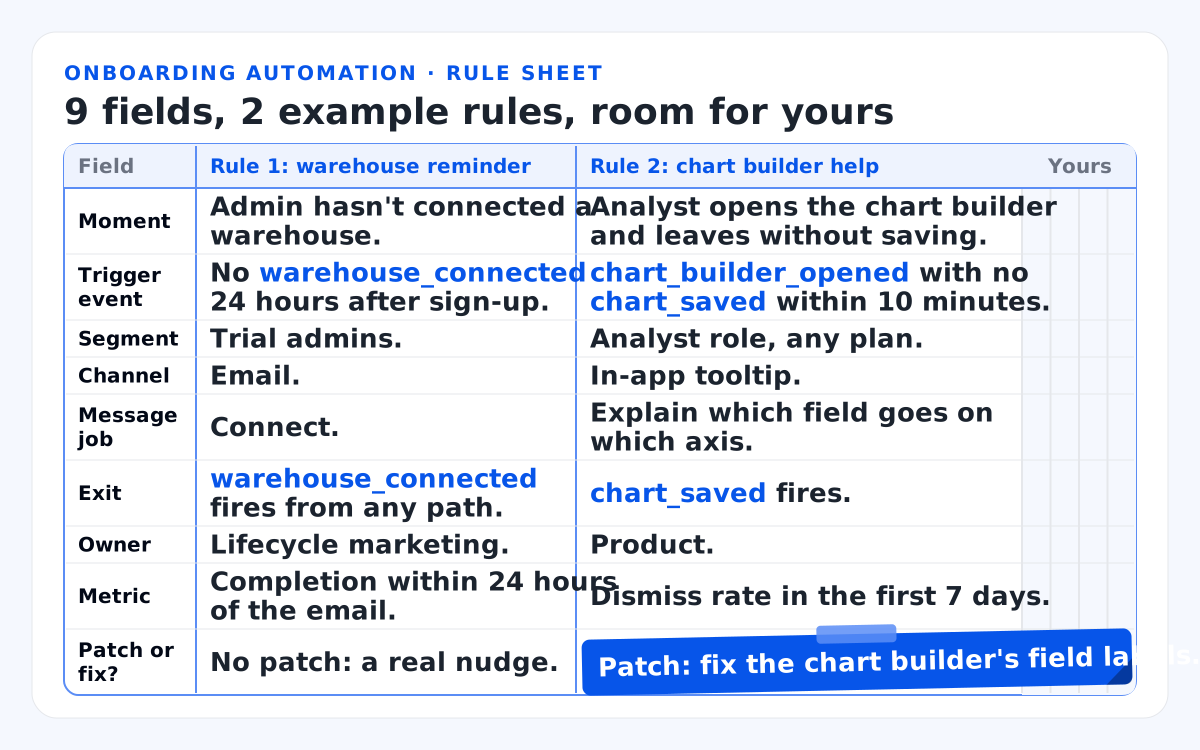
This table shows each field of the rule sheet with two hypothetical rules filled in.
| Field | Rule 1: warehouse reminder | Rule 2: chart builder help |
|---|---|---|
| Moment | Admin hasn't connected a warehouse. | Analyst opens the chart builder and leaves without saving. |
| Trigger event | No warehouse_connected 24 hours after sign-up. |
chart_builder_opened with no chart_saved within 10 minutes. |
| Segment | Trial admins. | Analyst role, any plan. |
| Channel | Email. | In-app tooltip. |
| Message job | Connect. | Explain which field goes on which axis. |
| Exit | warehouse_connected fires from any path. |
chart_saved fires. |
| Owner | Lifecycle marketing. | Product. |
| Metric | Completion within 24 hours of the email. | Dismiss rate in the first 7 days. |
| Patch or fix? | No patch: a real nudge. | Patch: fix the chart builder's field labels. |
A rule whose message job is "explain," not "connect," "invite" or "try," usually patches a screen. Rule 2 exists because the builder's fields are unclear, so its real fix is in the screen. Fill in one column per live rule and count the patches. Shipping the rules is half the job; proving they help is the other half.
How do you measure user onboarding automation?
Measure user onboarding automation against a holdout group: compare activation for users who got the rules with a random group that got none, then check each rule for harm.
Without a holdout, a team credits its emails for activations that would have happened anyway. Braze, one engagement platform, documents a global control group of 1% to 15% of users who receive no campaigns. Its documentation suggests reading results over at least 1 month, because shorter windows fluctuate.
The method is tool-neutral, and a random flag in your own code does the same job. In the hypothetical analytics product, I'd hold out 10% of users and read the rules' lift from the holdout, not from a before-and-after chart alone.
In our onboarding projects, we help set up an A/B test where possible and compare activation before and after.
The illustrative chart below shows 2 activation curves over the first 14 days and the gap you can credit to automation; it holds no real data.
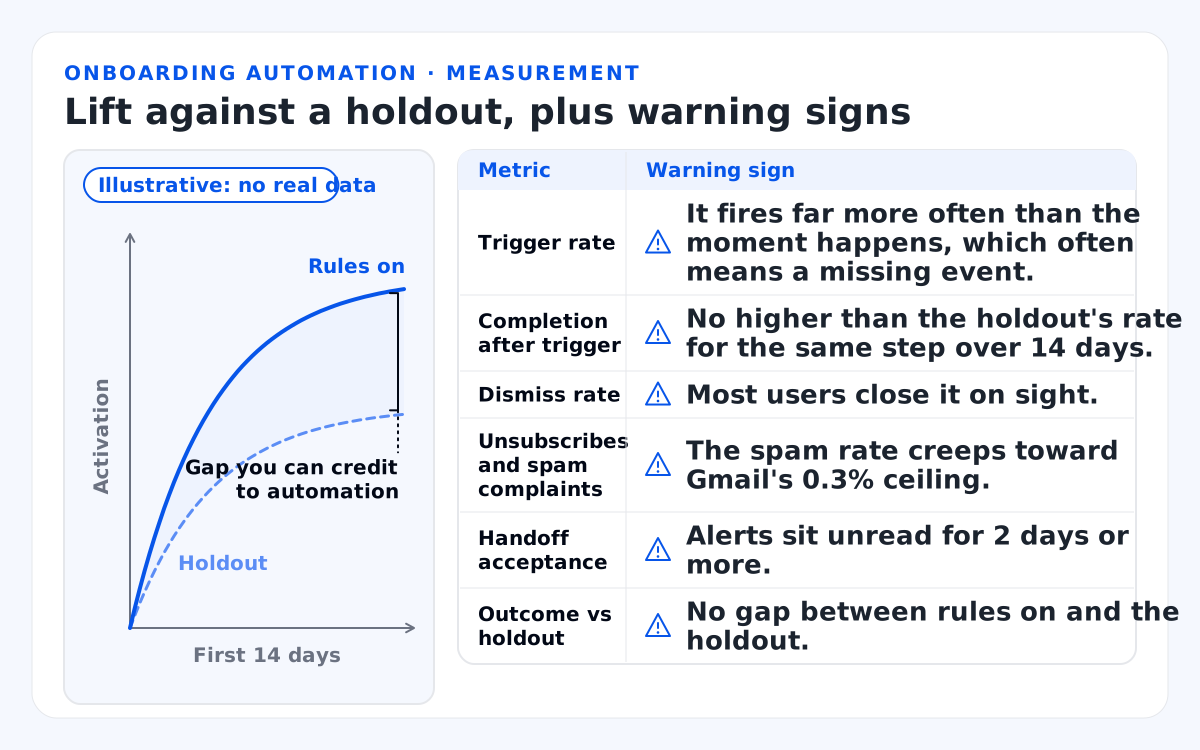
Illustrative chart, no real data: activation for rules on vs the holdout over the first 14 days; the gap is what you can credit to automation.
This table lists each metric, what it tells you and the warning sign to watch.
| Metric | What it tells you | Warning sign |
|---|---|---|
| Trigger rate | How often the rule fires. | It fires far more often than the moment happens, which often means a missing event. |
| Completion after trigger | Whether users do the step after the message. | No higher than the holdout's rate for the same step over 14 days. |
| Dismiss rate | Whether guidance arrives at the wrong moment. | Most users close it on sight. |
| Unsubscribes and spam complaints | Whether emails feel unwanted. | The spam rate creeps toward Gmail's 0.3% ceiling. |
| Handoff acceptance | Whether the person acts on alerts. | Alerts sit unread for 2 days or more. |
| Outcome vs holdout | Whether the whole system helps. | No gap between rules on and the holdout. |
For the outcome row, I use the 3 metrics we track in our onboarding projects: activation rate, time to first value and day-7 return rate. I compare each one with the holdout, reading activation within the first 7 days and again within 14 days.
I quote no benchmark rates for these, because they vary by product. Pause any rule whose dismissals or complaints climb. Sometimes the numbers say the rules make things worse.
When does user onboarding automation hurt?
User onboarding automation hurts when it patches a confusing screen, fires on missing events, stacks messages, uses the wrong segment or traps users with no exit; then fix the product.
These are the 5 failure modes I check for first:
- Patching a screen: a rule whose job is to explain points to a design problem in sign-up, setup or an empty state. A clear screen needs no explanation.
- Bad events: rules fire on users who already did the step, because a second path never sends the event, as in the intro.
- Stacking: 3 rules hit one user within 24 hours, because nobody set a shared frequency cap or a priority order.
- Wrong segment: personalization runs on a welcome answer the user picked at random to get past the screen. Every later message misses.
- No exit: a tour of 9 steps with no close button, an AI assistant without a handoff, an email without an unsubscribe link. Each one traps a user who wanted out.
Go back to the patch-or-fix row. If more than a few rules say "patch," the screens underneath need user experience design, not another rule. That's the redesign work described at the top of this guide.
In our services, an onboarding redesign runs in 4 steps over 3 to 6 weeks, and here's what that redesign costs: $15,000–$45,000. We design onboarding that your team builds in code or in tools such as Appcues, Userpilot or Pendo. We judge it by the 3 outcome metrics above.
If your problems go well past onboarding, our wider SaaS product design practice covers the rest of the product. Either way, mark every patch in your sheet before the next sprint planning.
Bottom line
Automate the frequent, low-risk moments with behavior-based rules, keep people on the high-context ones, and fix the screens before you add rules.
Within the next 7 days, fill in the rule sheet for every rule you run. For each rule marked "patch," book a free consultation and bring the screen behind it. You'll hear back from a senior designer within one business day, Eastern Time (ET). When the patches pile up, the screens behind your onboarding rules need a redesign, not another rule.
Before you write your next rule, I'd make sure the event behind it fires from every path a user can take.
FAQs
Is SaaS user onboarding the same as employee onboarding?
No. SaaS user onboarding guides new customers inside a software product toward their first result. Employee onboarding sets up accounts, equipment and paperwork for new hires, with different tools, owners and metrics.
Do you need an onboarding tool to automate user onboarding?
No. Product events, an email platform and in-app components built in code can run the same rules. Onboarding tools let a product team change guidance without a release. As for the best user onboarding software, tools only deliver rules, so design the rules first and pick the tool that fits them.
How many automated messages should a new user get in a day?
No published number fits every product. I'd set one per-user cap across all rules and channels, such as 1 in-app message and 1 email per 24 hours. Then give each moment one channel and stop every rule the moment its step is done.
How does CAN-SPAM treat onboarding emails?
By primary purpose. Under the FTC's guidance, an email that mainly helps a customer use an account they signed up for can be transactional or relationship content. An upgrade pitch can make it commercial, and then it needs an opt-out. I keep setup help at the top of each onboarding email and send upgrade offers separately; ask your counsel to review your own templates.
Can an AI assistant replace human onboarding?
No. An AI assistant can answer setup questions and suggest next steps. It still needs a clear path to a person, with the conversation passed along, for permissions, billing, data and frustrated customers.